


Statamic Builder
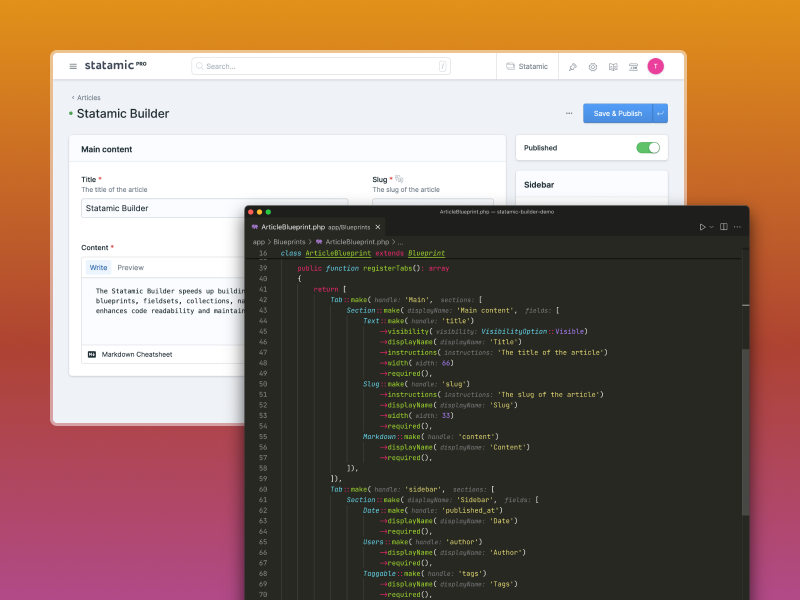
The Statamic Builder speeds up building Statamic sites. It offers a clear method to define sites, blueprints, fieldsets, collections, navigations and taxonomies using PHP classes. This approach enhances code readability and maintainability compared to writing YAML files.
Features
- Fluent API: Define Statamic components using a clean, chainable PHP API.
- Auto-discovery: Automatically discover and register your components from the filesystem.
- Navigation Support: Easily define and manage Statamic Navigations in PHP.
- Global Sets & Taxonomies: Full support for Global Sets and Taxonomies.
- Multi-site Support: Define and manage multiple sites through PHP classes.
- Artisan Commands: Generate blueprints, fieldsets, collections, and more with dedicated commands.
- YAML Export: Export your PHP-defined components to standard Statamic YAML files.
- Eloquent Support: Full support for Statamic Eloquent Driver for Global Sets, Navigations and Collections (mount).
Installation
You can install this addon with composer:
composer require tdwesten/statamic-builderRequirements
- PHP 8.3+
- Statamic 6.0+
- Laravel 12+
Configuration
You can publish the configuration file using:
php artisan vendor:publish --tag=statamicThe configuration file allows you to manually register components or enable auto-discovery.
Options
| Option | Description |
|---|---|
blueprints |
Manual registration of blueprints, grouped by namespace. |
fieldsets |
Manual registration of fieldsets. |
collections |
Manual registration of collections. |
taxonomies |
Manual registration of taxonomies. |
globals |
Manual registration of global sets. |
sites |
Manual registration of sites. |
navigations |
Manual registration of navigations. |
asset_containers |
Manual registration of asset containers. |
auto_registration |
Enable or disable auto-discovery of components. |
auto_discovery |
Define custom paths for auto-discovery of each component type. |
Auto Registration & Discovery
Enable auto_registration in config/statamic/builder.php to automatically find components in your app/ directory.
'auto_registration' => true,Discovery Requirements
For components to be auto-discovered, they must implement certain static methods:
- Blueprints: Must implement
static function handle()andstatic function blueprintNamespace(). - Collections, Taxonomies, Globals, Navigations, Asset Containers: Must implement
static function handle(). - Sites: Must implement
function handle().
Blueprints and Fieldsets
Creating a Blueprint
- Generate a blueprint:
php artisan make:blueprint PageBlueprint
- Define your fields in the
registerTabsmethod:
namespace App\Blueprints; use Tdwesten\StatamicBuilder\Blueprint;use Tdwesten\StatamicBuilder\FieldTypes\Section;use Tdwesten\StatamicBuilder\FieldTypes\Text;use Tdwesten\StatamicBuilder\FieldTypes\Tab; class PageBlueprint extends Blueprint{ public static function handle(): string { return 'page'; } public static function blueprintNamespace(): string { return 'collections.pages'; } public function registerTabs(): array { return [ Tab::make('General', [ Section::make('General', [ Text::make('title') ->displayName('Title') ->instructions('The title of the page') ->localizable() ->required() ]), ]), ]; }}Creating a Fieldset
- Generate a fieldset:
php artisan make:fieldset HeroFieldset
- Define fields:
namespace App\Fieldsets; use Tdwesten\StatamicBuilder\Fieldset;use Tdwesten\StatamicBuilder\FieldTypes\Assets;use Tdwesten\StatamicBuilder\FieldTypes\Text; class HeroFieldset extends Fieldset{ public function registerFields(): array { return [ Text::make('title')->displayName('Title')->required(), Assets::make('image')->displayName('Image')->maxItems(1), ]; }}Collections, Taxonomies, and Globals
Collections
Generate a collection:
php artisan make:collection Articlesnamespace App\Collections; use Tdwesten\StatamicBuilder\BaseCollection; class Articles extends BaseCollection{ public static function handle(): string { return 'articles'; } public function title(): string { return 'Articles'; }}Most methods in BaseCollection now have default implementations, so you only need to override what you want to
change (e.g., route(), sites(), template()).
Taxonomies
Generate a taxonomy:
php artisan make:taxonomy CategoriesGlobal Sets
Global sets can be defined as PHP classes. This allows you to manage global variables and their localization through PHP classes.
-
Generate a global set:
php artisan make:global-set SiteSettings -
Configure your global set:
namespace App\Globals; use Tdwesten\StatamicBuilder\BaseGlobalSet; class SiteSettings extends BaseGlobalSet{ public static function handle(): string { return 'site_settings'; } public function title(): string { return 'Site Settings'; }}By default, the global set will use the default site. You can override the sites() method to support multiple sites.
Blueprint for Global Sets
To define fields for your global set, create a blueprint with the same handle in the globals namespace:
namespace App\Blueprints\Globals; use Tdwesten\StatamicBuilder\Blueprint;use Tdwesten\StatamicBuilder\FieldTypes\Section;use Tdwesten\StatamicBuilder\FieldTypes\Text;use Tdwesten\StatamicBuilder\FieldTypes\Tab; class SiteSettingsBlueprint extends Blueprint{ public static function handle(): string { return 'site_settings'; } public static function blueprintNamespace(): string { return 'globals'; } public function registerTabs(): array { return [ Tab::make('General', [ Section::make('General', [ Text::make('site_name') ->displayName('Site Name') ->required() ]), ]), ]; }}Asset Containers
Generate an asset container:
php artisan make:asset-container Mainnamespace App\AssetContainers; use Tdwesten\StatamicBuilder\BaseAssetContainer; class Main extends BaseAssetContainer{ public static function handle(): string { return 'main'; } public function title(): string { return 'Main Assets'; } public function disk(): string { return 'public'; }}Most methods in BaseAssetContainer have default implementations, so you only need to override what you want to
change (e.g., disk(), allowUploads(), createFolders()).
Navigations
Generate a navigation:
php artisan make:navigation Mainnamespace App\Navigations; use Tdwesten\StatamicBuilder\BaseNavigation; class Main extends BaseNavigation{ public static function handle(): string { return 'main'; } public function collections(): array { return ['pages']; } public function maxDepth(): ?int { return 3; }}Multi-site Support
Generate a site:
php artisan make:site BlogWorking with Foreign Fieldsets
When working with a mixed codebase or utilizing other Statamic addons, you can import their fieldsets using
ForeignFieldset and ForeignField.
use Tdwesten\StatamicBuilder\FieldTypes\ForeignField;use Tdwesten\StatamicBuilder\FieldTypes\ForeignFieldset; // In your registerTabs() method:Section::make('External', [ ForeignFieldset::make('statamic-peak-seo::seo_basic') ->prefix('myseo_'), ForeignField::make('mytext', 'foreign_fields.bard') ->config([ 'width' => '25', 'display' => "My Bard Field", 'validate' => 'required', ])]),Supported Field Types
Statamic Builder supports all core Statamic field types. Use the make($handle) method to instantiate them.
| Field Type | Class |
|---|---|
| Array | Arr |
| Assets | Assets |
| Bard | Bard |
| Button Group | ButtonGroup |
| Checkboxes | Checkboxes |
| Code | Code |
| Collections | Collections |
| Color | Color |
| Date | Date |
| Dictionary | Dictionary |
| Entries | Entries |
| Float | FloatVal |
| Form | Form |
| Grid | Grid |
| Group | Group |
| Hidden | Hidden |
| HTML | Html |
| Icon | Icon |
| Integer | Integer |
| Link | Link |
| Lists | Lists |
| Markdown | Markdown |
| Money | Money |
| Navs | Navs |
| Number | Number |
| Password | Password |
| Radio | Radio |
| Range | Range |
| Rating | Rating |
| Replicator | Replicator |
| Reveal | Revealer |
| Section | Section |
| Select | Select |
| Sites | Sites |
| Slug | Slug |
| Spacer | Spacer |
| Structures | Structures |
| Table | Table |
| Taggable | Taggable |
| Taxonomies | Taxonomies |
| Template | Template |
| Terms | Terms |
| Text | Text |
| Textarea | Textarea |
| Time | Time |
| Toggle | Toggle |
| User Groups | UserGroups |
| User Roles | UserRoles |
| Users | Users |
| Video | Video |
| Width | Width |
| YAML | Yaml |
| ... and many more. |
Custom Fields
You can create a custom field by extending the Field class or using the generator:
composer generate-field MyFieldArtisan Commands
| Command | Description |
|---|---|
make:blueprint |
Create a new Blueprint class. |
make:fieldset |
Create a new Fieldset class. |
make:collection |
Create a new Collection class. |
make:taxonomy |
Create a new Taxonomy class. |
make:global-set |
Create a new Global Set class. |
make:navigation |
Create a new Navigation class. |
make:asset-container |
Create a new Asset Container class. |
make:site |
Create a new Site class. |
statamic-builder:export |
Export definitions to YAML. |
Exporting to YAML
If you need to generate standard Statamic YAML files from your PHP definitions:
php artisan statamic-builder:exportChanges
Version 1.1.0 (Refactoring & Auto-discovery)
- Base Classes:
BaseCollection,BaseGlobalSet, andBaseNavigationnow provide default implementations for several methods that were previously abstract. While this simplifies new components, ensure your existing components still behave as expected if they were relying on the previous abstract structure. - Search Index:
BaseCollection::searchIndex()return type is now nullable (?string). - Blueprints: Blueprints now prefer static
handle()andblueprintNamespace()methods for better auto-discovery support.
Version 1.2.0 (Enhanced Components & Commands)
- Global Sets & Navigations: Fully integrated with Statamic repositories, allowing for saving and better multi-site support.
- New Commands: Added
make:siteandmake:asset-containerfor faster development. - Generator Refactoring: Unified logic for all generator commands.
- Field Types: Added several new field types including
Color,Hidden,Money,Number,Password,Rating,Time, andVideo.