


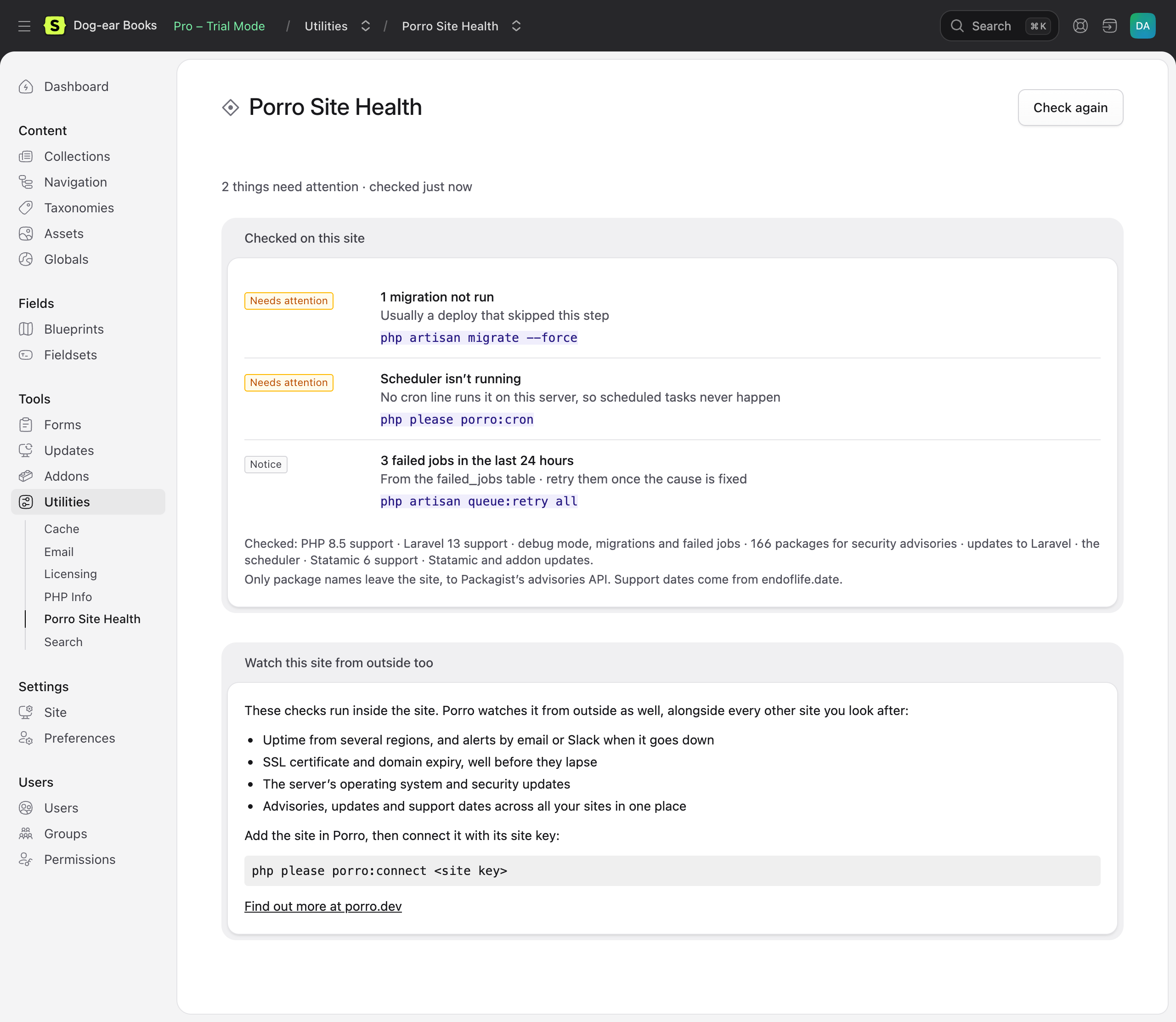
Site health for Statamic 5 and 6, inside the control panel. It checks the site for the things that quietly go wrong between projects (security advisories in your Composer packages, PHP, Laravel and Statamic versions running out of security support, updates waiting, a scheduler that never runs) and tells you what to do about each.
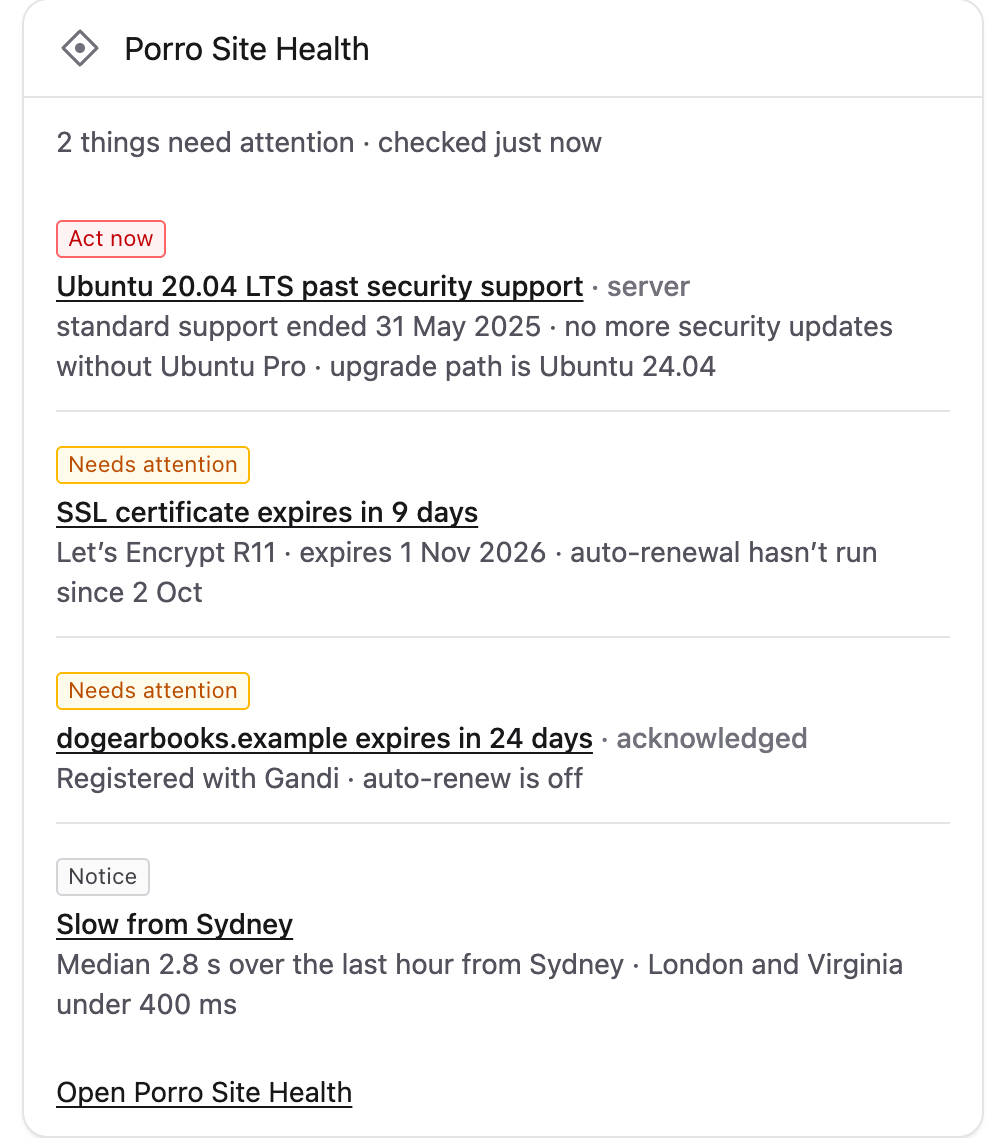
It's free and works on its own. If you use Porro to look after your sites, connecting it adds what can only be seen from outside: uptime, SSL certificates, domain expiry and the server's operating system.
Install
composer require porro/statamic-connectorThen run php please migrate (it adds the blocklist and activity tables) and open Porro → Site Health in the control panel.
Dashboard widget
Add it to config/statamic/cp.php:
'widgets' => [ ['type' => 'porro_site_health', 'width' => 50],],It lists the five most important issues ('limit' => 5 to change that) and links to Site Health. It shows the last result rather than running the checks, so the dashboard never waits on them.
Who can see it
Super admins. For other roles, under Porro in Users → Roles:
- View Porro Site Health shows both pages, the widget and the "Check again" button.
- Block and safelist IP addresses adds the block, unblock and safelist buttons.
Upgrading from 0.2? The old Access Porro Site Health utility permission isn't used any more. Give those roles View Porro Site Health instead.
What it checks
On the site itself, with no account:
| Check | How |
|---|---|
Security advisories in composer.lock |
Packagist's security advisories API, the one composer audit uses. Only package names are sent; versions are matched on your server. High and critical advisories show as Act now. |
| PHP, Laravel and Statamic support | Past, or within 90 days of, the end of security support, from endoflife.date. A copy ships with the addon for when it can't be reached. |
| Updates | Statamic and addon updates from Statamic's own updater (flagged when one is a security release), and newer Laravel releases on the major version you run |
| Scheduler | Whether schedule:run is running, from a heartbeat the addon schedules every 15 minutes, and whether the crontab has the line. php please porro:cron adds it. |
| Debug mode, migrations, failed jobs | APP_DEBUG on in production, migrations not run, failed jobs in the last 24 hours |
| Backups and health checks | Stale backups from spatie/laravel-backup and failing spatie/laravel-health checks, if you use them |
Results are cached for five minutes, and the public data behind them for between six hours and a day, so the page is quick and the APIs aren't asked often. Check again runs everything now.
Suspicious activity and blocking
Also free and on the site itself. IP addresses aren't sent to Porro, and only leave the server in the cases listed under Where IP addresses go: Cloudflare and reverse-DNS lookups on an IP's details page, the AbuseIPDB button, and blocking at Cloudflare. The rules are the Laravel connector's, so its README has every setting.
- What's watched: probes for files like
/.env,/.gitandwp-login.php, failed logins (from Laravel'sFailedauth event, which the control panel's login fires; token guards and custom guards that don't fire it aren't counted), bursts of 404s and form floods. Counts are kept for 48 hours in Porro's ownporro_cachetable, so a deploy's cache clear doesn't wipe them, and usernames only as hashes. - Suspicious requests are batched: each one appends a line to
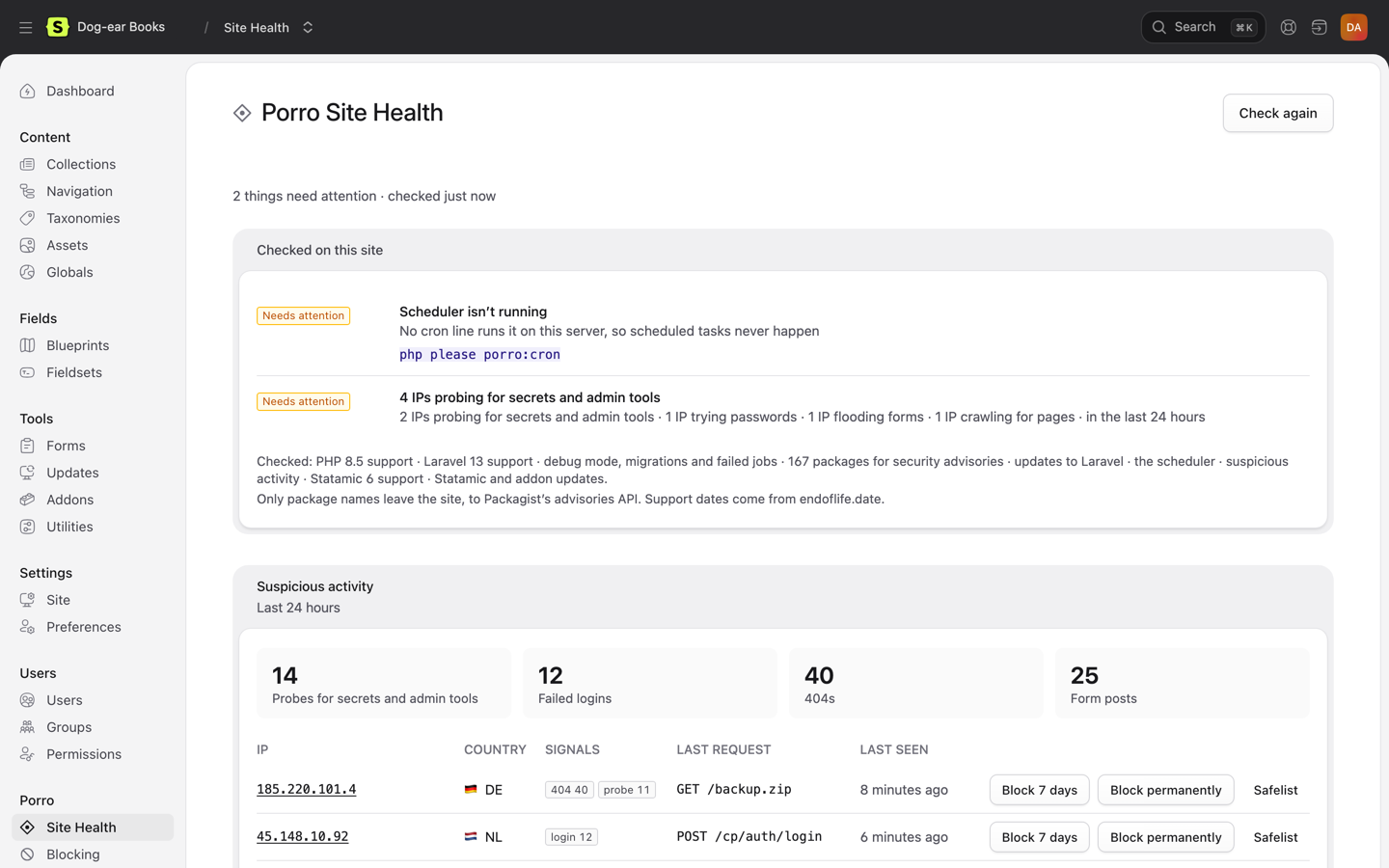
storage/porro/activity.bufon its server, and the lines are recorded every minute by the scheduler, now and then at the end of a suspicious request, and whenever an activity page opens. Flags can lag by up to a minute; blocking is immediate. Where storage can't be written, or on Lambda (Vapor), each request is recorded straight away.PORRO_ACTIVITY_BUFFER=falseturns batching off. - Site Health lists the IPs worth a look, worst first, with badges for Tor exits, Spamhaus DROP, hosting networks and research scanners, and Block 7 days, Block permanently and Safelist buttons. Each one asks first, in a confirmation that says what will happen and for how long.
- Exposed files: if
/.envor/.gitever answers, that's raised as Act now. - IP details: click an IP for its network (from Cloudflare's API when
PORRO_CLOUDFLARE_TOKENis set, which sends Cloudflare the IP), a reverse-DNS hostname checked both ways, what it did here over 48 hours, and a plain note when something claiming to be Googlebot or Bingbot isn't. WithPORRO_ABUSEIPDB_KEY, a button checks AbuseIPDB; it sends the IP to AbuseIPDB, so it only runs when clicked.
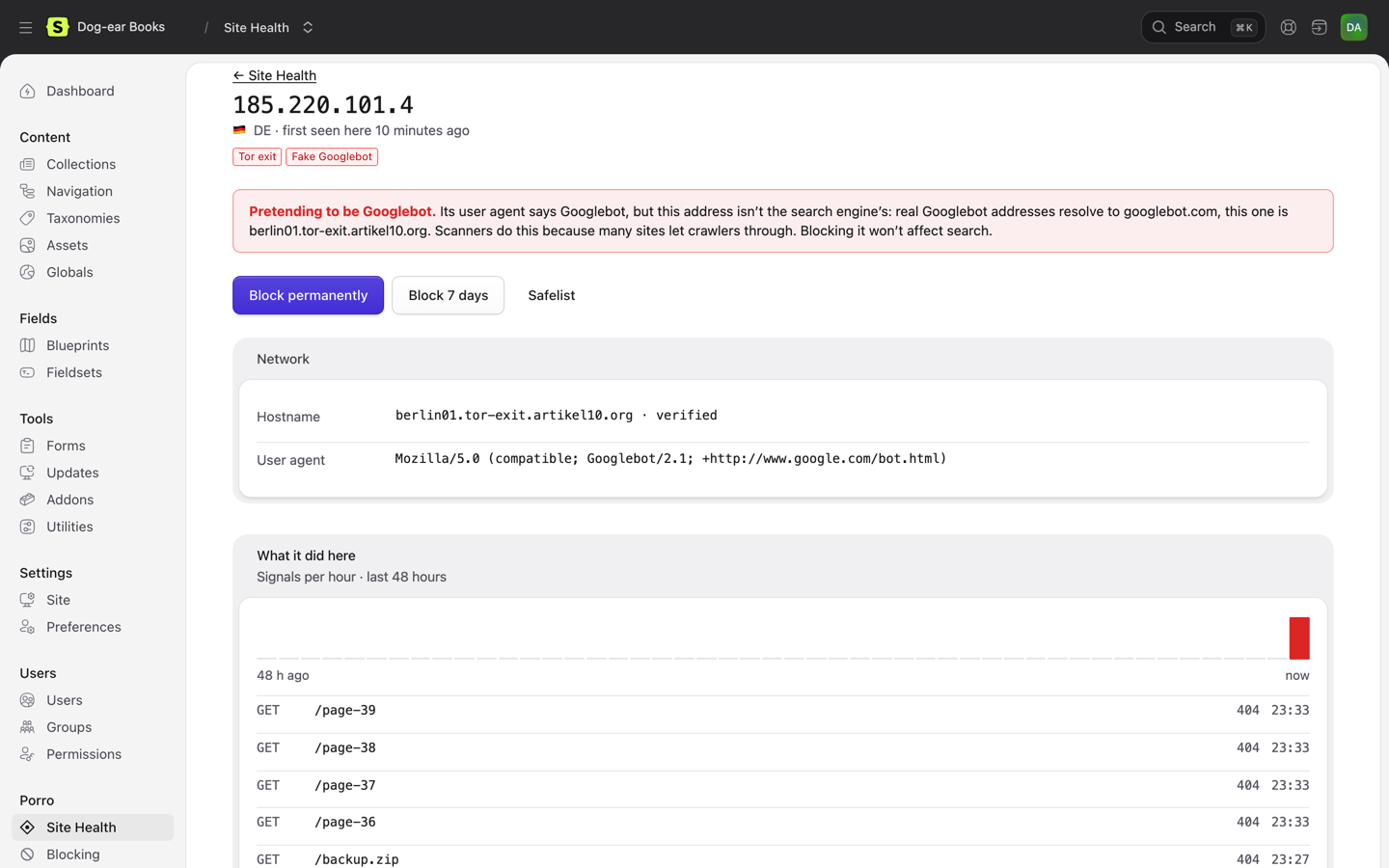
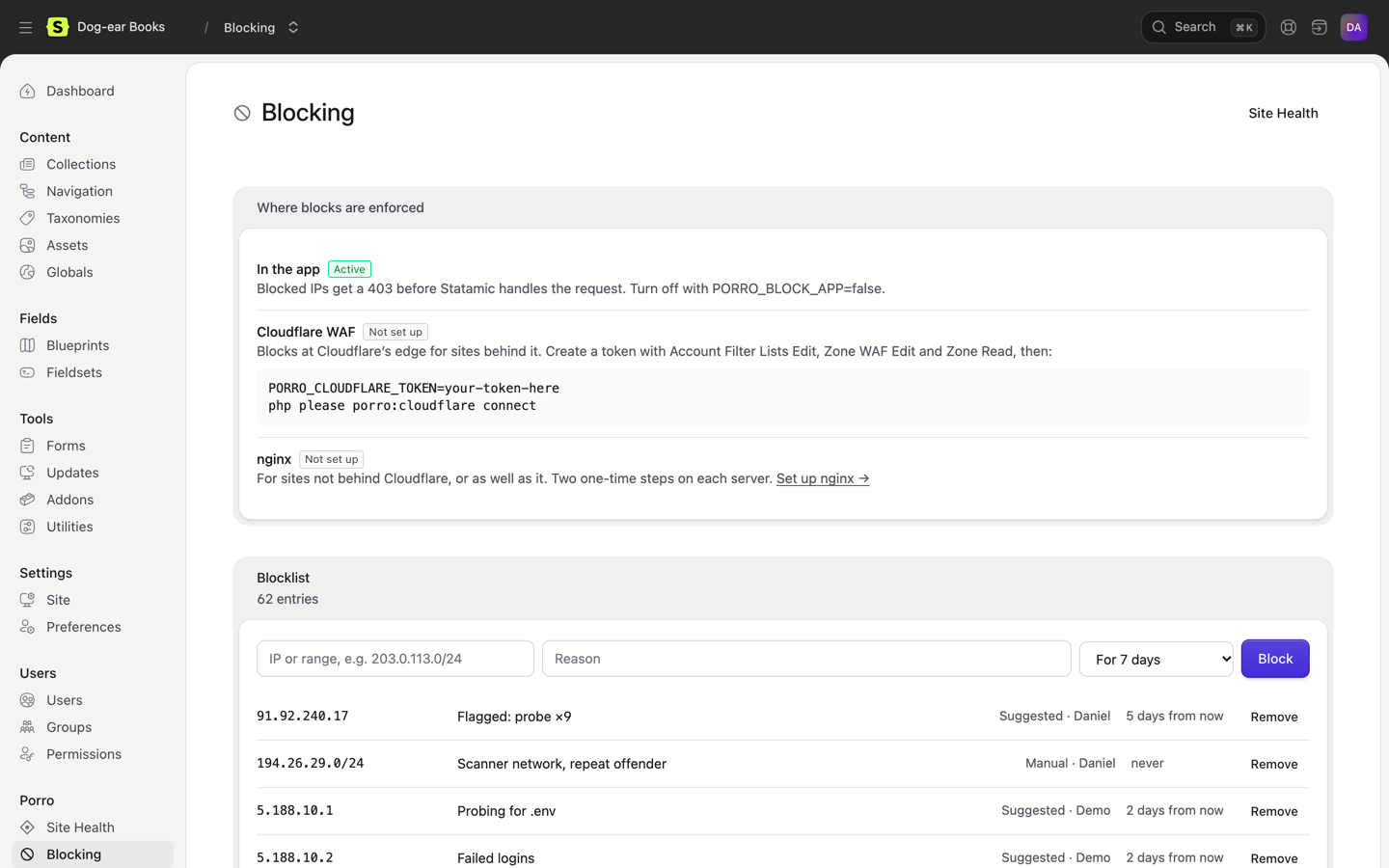
- The Blocking page: where blocks are enforced, the newest of the blocklist and safelist (each searchable on its own page, 50 at a time), and what's always protected.
- Where blocks are enforced:
- In the app: blocked IPs get a plain 403 before Statamic runs. On by default;
PORRO_BLOCK_APP=falseturns it off. - At Cloudflare's edge: open Porro → Blocking → Set up Cloudflare and follow three steps. Create a token with Zone WAF Rules: Edit and Zone: Read on the site's domain, plus Account Rule Lists: Edit on the account. Set it as
PORRO_CLOUDFLARE_TOKEN, then press Connect (or runphp please porro:cloudflare connect). It adds one rule next to your existing ones, and only production syncs. Blocked IPs and ranges go into the account'sporro_blocklistlist with their notes. The list belongs to the whole Cloudflare account, so every site you connect on that account shares its blocks. - In nginx:
PORRO_BLOCK_NGINX=true, then Blocking → Set up nginx walks through three steps with this site's real paths and shows how far each server has got.
- In the app: blocked IPs get a plain 403 before Statamic runs. On by default;
- Always protected: Cloudflare, Laravel Forge and its health checks, Google's and Bing's published crawler ranges, and private addresses: a block that covers any of them is refused when you try to add it, and the app never turns them away. Open each on the Blocking page to see its ranges and why. Not on Forge?
PORRO_PROTECT_FORGE=false. Happy to block a crawler?PORRO_PROTECT_CRAWLERS=false. Blocks of your own IP or very wide ranges are refused too.
- Production only: activity is recorded in production only (
PORRO_ACTIVITY=trueto record elsewhere). Blocks apply everywhere. - Static caching: pages served from Statamic's static cache never reach the app, so traffic counts run low. Probes and logins aren't served from the static cache, so they're still caught.
- Country: comes from Cloudflare when the site is behind it. Otherwise it comes from DB-IP's free country file, downloaded monthly to
storage/porro.
Connect Porro (optional)
Porro watches every site you look after from outside: uptime from several regions, SSL and domain expiry, the server's OS and security updates, with alerts by email or Slack. It's a separate service with its own account; see porro.dev for plans. Nothing in this addon needs it, and nothing is sent to Porro until you connect. Add the site in Porro, then:
php please porro:connect <site key>Site Health then shows the site's open findings in Porro alongside the checks above, each linking to Porro.
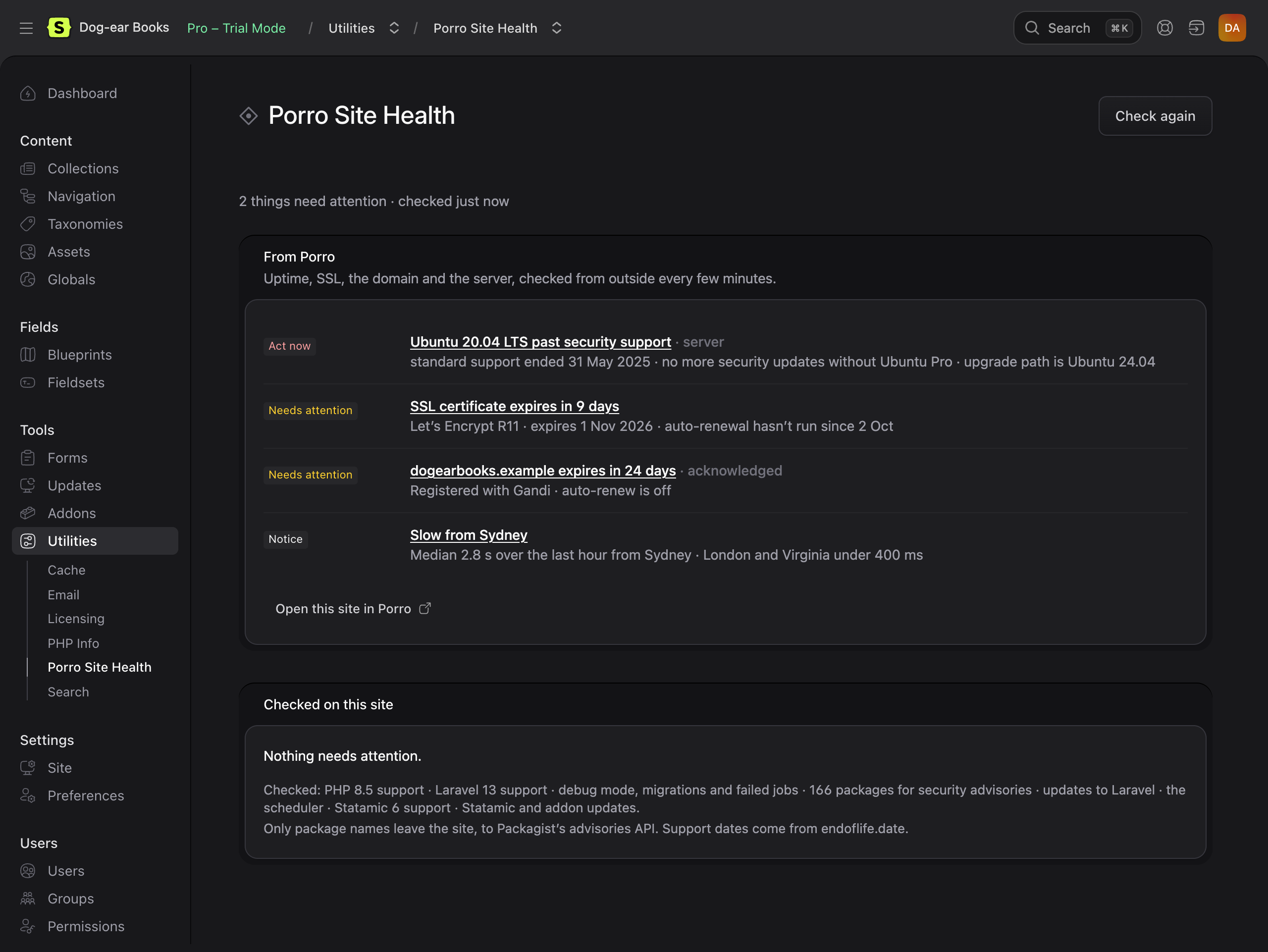
Connecting also sends Porro a signed report every 15 minutes on Laravel's scheduler: versions, packages and the health facts above, never content, users or settings values. Run php artisan porro:status --json to see exactly what would be sent, and see the Laravel connector for config and commands.
php please porro:connect offers to add the scheduler's cron line; php please porro:cron adds it on its own and, once the site is connected, sends a report straight away. See Scheduling reports to add it on Forge, Ploi, Laravel Cloud and other hosts.
Scheduling reports
Laravel's scheduler needs to run php artisan schedule:run from the project folder every minute. Reports, the scheduler check and activity batching all run on it.
php please porro:cron adds the line to the server's crontab for you, or tells you it's already there. Once the site is connected it also sends a report straight away, so Porro stops saying cron is missing without waiting for the first scheduled one. If it can't reach the crontab, it prints the line to add by hand, using one of the guides below.
Zero-downtime deploys (Forge, Envoyer, Ploi, Deployer): always point cron at the current folder, e.g. /home/forge/example.com/current, never a releases/… folder. A release folder runs old code after the next deploy and stops working once it's cleaned up, with no error you'd see. php please porro:cron uses current for you.
Laravel Forge
Open the site and turn on Laravel scheduler in its Laravel settings. That's all: Forge adds the every-minute schedule:run job for the site, from the right folder.
To add it by hand instead, go to the server's Scheduler and add a New scheduled job:
- Command:
php /home/forge/example.com/current/artisan schedule:run. Leave out/currentif the site doesn't use zero-downtime deploys. On an isolated site, use the site's own user in the path. - User:
forge, or the site's isolated user. Neverroot. - Frequency: every minute.
If you add sites through Porro's one-click install on Forge, it turns on the Laravel scheduler for you when the Forge API token has the optional server:create-schedulers scope.
Ploi
Open the server's Cronjobs and add one:
- Command:
php /home/ploi/example.com/artisan schedule:run, with/currentbefore/artisanon zero-downtime sites. - User:
ploi, or the site's own user. - Frequency: every minute.
Laravel Cloud
There's no crontab. Open the environment, edit the App cluster and turn on Scheduler. Cloud then runs schedule:run every minute. Set PORRO_KEY as an environment variable rather than running php please porro:connect there.
Laravel Vapor
Vapor runs the scheduler for you unless vapor.yml sets scheduler: false. Leave it on, and set PORRO_KEY as an environment variable.
Envoyer
Envoyer deploys but doesn't run cron. Add the job on the server itself (Forge's Scheduler, or crontab -e), pointing at Envoyer's current folder: php /home/forge/example.com/current/artisan schedule:run.
cPanel or Plesk
- cPanel: Advanced → Cron Jobs. Choose Once Per Minute and use
cd /home/user/example.com && php artisan schedule:run > /dev/null 2>&1. - Plesk: Websites & Domains → Scheduled Tasks → Add Task. Choose Run a command, Cron style
* * * * *, and the same command.
If php isn't found, or runs an older PHP than the site, use the full path your host lists for the site's PHP version.
Any other server (crontab)
Run crontab -e as the user that owns the site (not root) and add:
* * * * * cd /path/to/site && php artisan schedule:run > /dev/null 2>&1Use the current path on zero-downtime deploys.
Requirements
- Statamic 5 or 6, Laravel 11–13, PHP 8.2+
- Outbound HTTPS to
packagist.org,repo.packagist.organdendoflife.date(andapp.porro.devonce connected). Without it, the checks that need them say so and the rest still run.
External requests
| To | When | What's sent |
|---|---|---|
packagist.org |
Advisory check, at most every 6 hours or when composer.lock changes |
Package names from composer.lock |
repo.packagist.org |
Laravel update check, at most twice a day | Nothing beyond the request |
endoflife.date |
Support dates, at most once a day | Nothing beyond the request |
app.porro.dev |
Only once connected: reports every 15 minutes, findings when Site Health is open (cached 5 minutes) | Signed with the site key |
www.cloudflare.com, forge.laravel.com |
Their published IP ranges, once a day | Nothing beyond the request |
developers.google.com, www.bing.com |
Google's and Bing's published crawler ranges, once a day | Nothing beyond the request |
check.torproject.org, www.spamhaus.org |
The Tor exit and Spamhaus DROP lists, when an IP's details page opens (cached an hour and a day) | Nothing beyond the request |
api.cloudflare.com |
Only with PORRO_CLOUDFLARE_TOKEN: syncing blocks, and opening an IP's details page (cached a day per IP) |
Blocked IPs and ranges with their notes, and the IP being looked at |
api.abuseipdb.com |
Only with PORRO_ABUSEIPDB_KEY, when someone clicks the reputation button |
The IP being checked |
download.db-ip.com |
The free country file, once a month, where activity is recorded | Nothing beyond the request |
Support
Questions and bugs: GitHub issues. Security issues: please email security@porro.dev rather than opening an issue. We reply within one working day.
Demo
Dog-ear Books is a demo site with the addon set up and things for it to find, a stand-in Porro for the connected view, and the end-to-end checks and screenshot script behind these images.
Developing
composer installcomposer testLicense
MIT. See CHANGELOG.md for what changed.