


Realtime teamwork for the Statamic control panel, on Hibira:
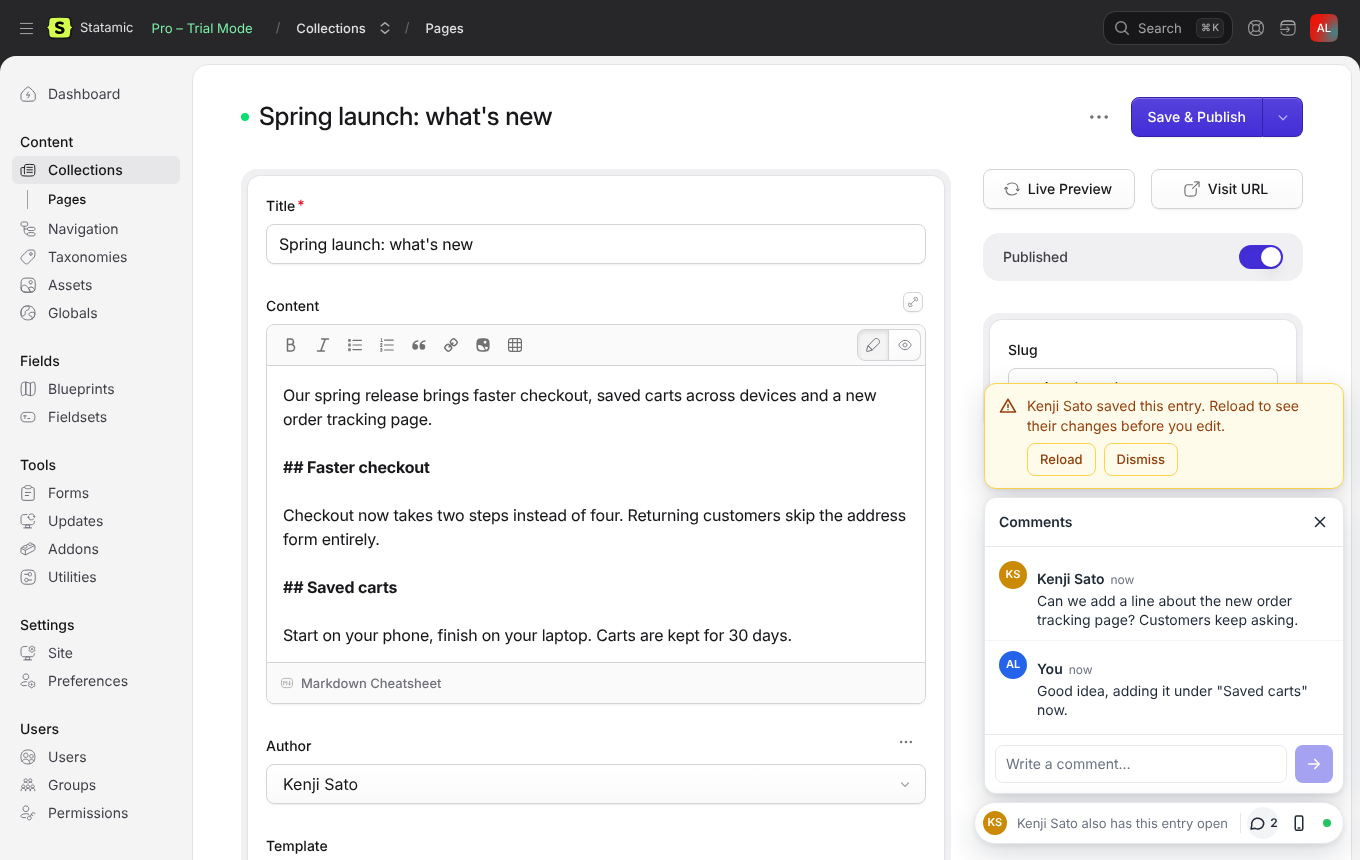
- Who else is here. The avatars of everyone who has the same entry open, and a warning the moment one of them saves it, so nobody keeps editing an old version.
- Live comments. Leave a question or a note on an entry. Everyone who has it open sees new comments as they are written; resolve them when they are done. Reviewers who may only view an entry can comment too.
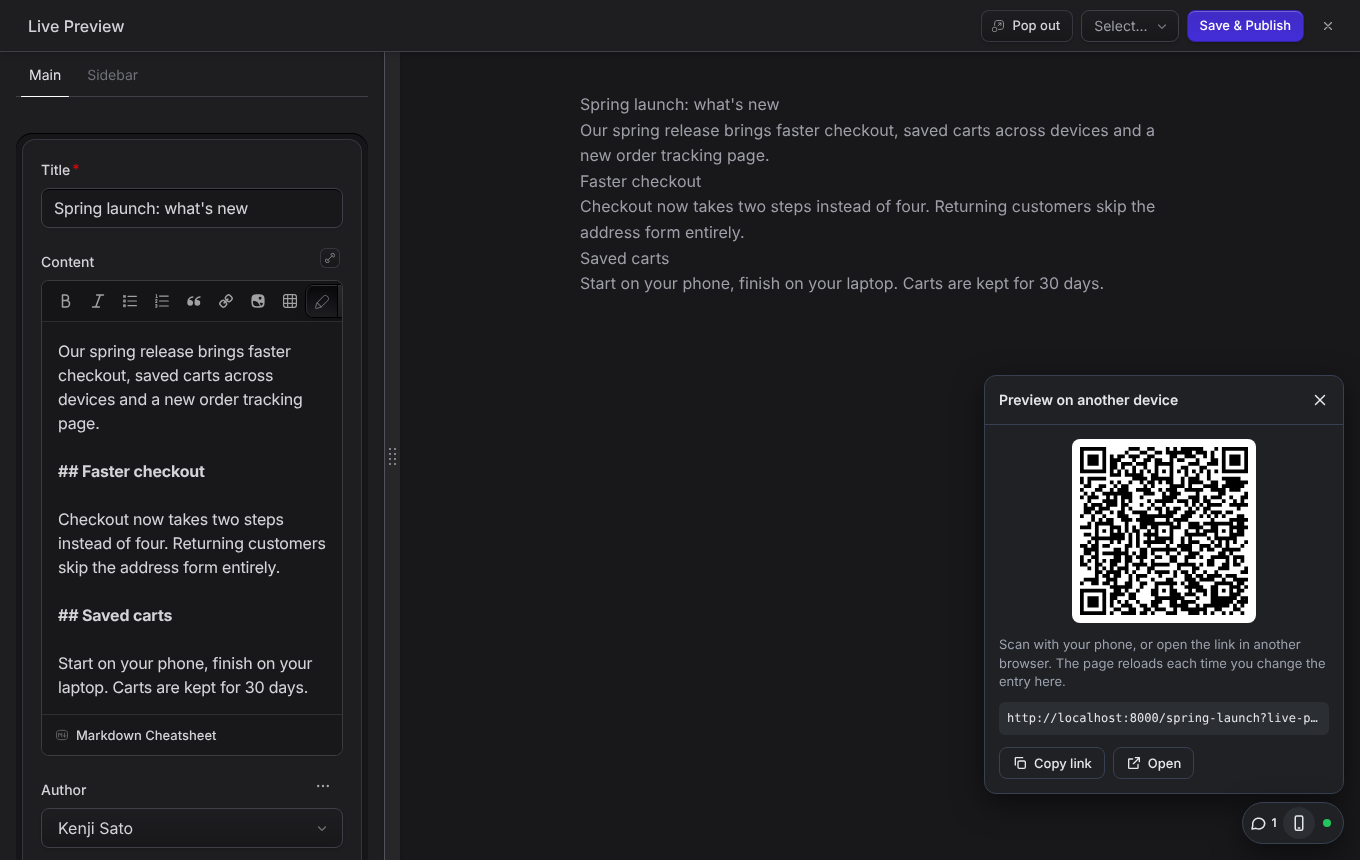
- Live preview on any device. Scan a QR code to open your live preview on your phone, or send the link to another browser. The page reloads every time you change the entry, and keeps its scroll position.
Works with Statamic 5 and 6, flat file or database. Comments need no database, and there is nothing to publish or build.
Avatars, saved warnings and shared comments are about several people working in the same control panel, so they need more than one control panel user, which in Statamic generally means Statamic Pro. Live preview on another device is useful on Statamic Solo too.
Install
composer require hibira-io/statamicphp artisan hibira:installhibira:install (from hibira-io/laravel)
adds the HIBIRA_* settings to .env. Copy the app ID, key and secret from
your app page on hibira.io/portal (the free plan
needs no card), and check them with php artisan hibira:check.
On the same app page, add your site's address (for example
https://example.com) to Allowed origins, so the control panel and
preview pages may connect.
Open an entry in two browsers, signed in as two users. The dock appears in the bottom right corner.
What it does
| Avatars | Everyone with the entry's edit page open. Hover for the name. |
| Saved warning | When someone else saves the entry, a card asks you to reload before you edit. Saves from the console (imports, scheduled publishing) are left out. |
| Comments | Plain text, up to 2,000 characters. Ctrl+Enter sends. Anyone who may view the entry can comment and resolve; the author or a super user can delete. |
| Live preview link | Open Live Preview on the entry once, then press the phone button for the QR code and link. The link works as long as Statamic's live preview token. |
People see only entries they may view: every channel subscription and comment request is checked against Statamic's own permissions.
In English, 繁體中文, 简体中文, 日本語, 한국어, ไทย and Tiếng Việt, following each user's control panel language.
Options
Publish the config to change them:
php artisan vendor:publish --tag=hibira-statamic-config| Setting | Default | |
|---|---|---|
presence |
true |
Avatars and saved warnings (HIBIRA_STATAMIC_PRESENCE) |
comments.enabled |
true |
Comments (HIBIRA_STATAMIC_COMMENTS) |
comments.path |
storage/statamic/hibira-comments |
One JSON file per entry. Point it inside content/ to keep comments in git with your content. |
comments.max_length |
2000 |
Characters per comment |
live_preview |
true |
Live preview on other devices (HIBIRA_STATAMIC_LIVE_PREVIEW) |
control_panel_echo |
true |
See below (HIBIRA_STATAMIC_CP_ECHO) |
Statamic's own broadcasting
Statamic's control panel has its own Echo client, which addons such as
statamic/collaboration use.
Statamic only knows how to point it at Pusher or Reverb. With
BROADCAST_CONNECTION=hibira, this addon fills in the Hibira host, so those
addons run on Hibira with no more setup. That client opens a connection on
every control panel page, so set HIBIRA_STATAMIC_CP_ECHO=false if you
don't use such an addon.
How it uses Hibira
- Each entry has a presence channel. The control panel signs subscriptions on its own route, for users who may view the entry, so you don't have to change your app's broadcasting setup.
- Comments are stored first. The others on the entry's channel get only the comment's ID and fetch the comment from the control panel, so long comments in any script go live. A page that lost its connection fetches them again when it reconnects.
- Events are sent after the response, so saving never waits on Hibira, even if it can't be reached.
- A live preview page opened outside the control panel listens on a public channel named after a keyed hash of its preview token, so only someone with the link can find it, and its events carry no content. Events are sent only while such a page is open.
- Each open edit page is one connection, and each preview page opened on another device is one more.
Your data and Hibira
Events go through Hibira, a hosted WebSocket service whose servers are in Hong Kong. What passes through it:
- the name (or email, when no name is set), initials and avatar URL of each control panel user who has an entry open, and the name of whoever saved it;
- entry and comment IDs, so open pages know to fetch comments again. The comment text itself stays on your server and is fetched from your own control panel;
- for live preview on another device, a reload signal with no content.
See the privacy policy.
Plan limits
Each open edit page is one connection, and each preview page opened on another device is one more. The free plan allows 100 concurrent connections and one app, which fits a small team; paid plans raise the connection, daily message and message size limits. Comments are never limited by message size, because only their IDs are sent. See hibira.io/pricing.
Support
Open an issue at github.com/hibira-io/statamic/issues or write to support@hibira.io.
Testing
composer testThe browser code is in resources/js. After changing it, rebuild dist/
with npm ci && npm run build.
License
MIT. dist/cp.js includes pusher-js, @stablelib/base64, @stablelib/utf8 and
qrcode-generator, all MIT licensed; their notices are in
THIRD-PARTY-NOTICES.
中文摘要
在 Statamic 控制台加上即時協作:同一篇內容誰也開著(頭像),有人儲存時立刻提醒重新載入;
即時留言(可標記已解決,只能看不能改的審稿人也能留言);用手機掃 QR Code 開即時預覽,
每次修改內容手機頁面就自動重新載入。支援 Statamic 5 與 6,留言存成 JSON 檔不需要資料庫。
多人協作功能需要多個控制台使用者(通常是 Statamic Pro)。使用者名稱、頭像網址與留言 ID 會經過位於香港的 Hibira;
留言內容留在你的伺服器上。免費方案 100 個同時連線、1 個 App。客服:support@hibira.io。
安裝:composer require hibira-io/statamic,php artisan hibira:install 填入
hibira.io/portal 的 App ID、Key、Secret,並把網站網址加到 Allowed origins。