
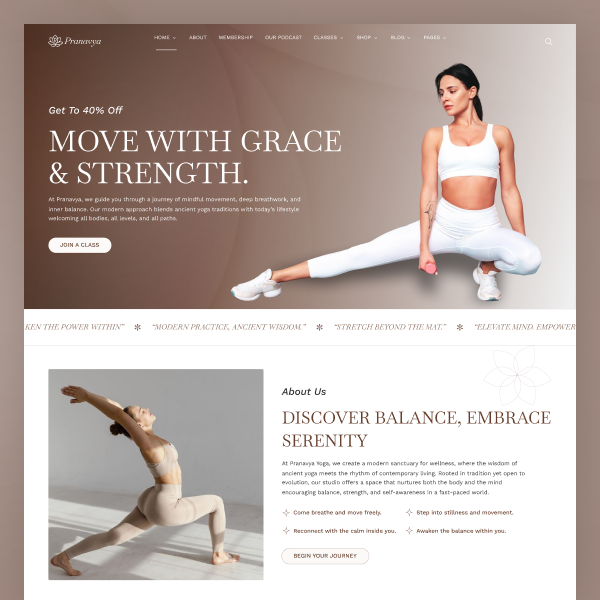

Yoga is a wellness starter kit for Statamic 5, and the main theme for five catalogues: class studio, fashion studio, restaurant, wedding planner, and construction. The install stays the yoga studio. One command swaps a catalogue's demo pages, photos, and palette.
Visitors can browse offerings and send booking or contact inquiries. This kit is a marketing site. Class booking is a demo inquiry form, not a live payment or reservation gateway.
Every marketing page uses one global Page template. Add, remove, or reorder Theme sections in the Control Panel. Collection details (class, blog, event, retreat, podcast, team) and Book Class / 404 keep their own templates.
Pages of Yoga
The starter kit includes a complete set of pages for a yoga studio:
- Home Pages: 4 variants (
/,/home-two,/home-three,/home-four) - About Us
- Classes:
- Classes listing (2 variants)
- Class detail
- Class category
- Book Class (dedicated template)
- Schedule
- Events: listing (2 variants) plus detail
- Retreats: listing plus detail
- Blog: listing (3 variants) plus detail
- Podcast: listing plus episode detail
- Team: listing plus member detail
- Membership, FAQ, Testimonials
- Contact Us, Privacy Policy, Terms & Condition
- 404
Theme sections
| Section | Purpose |
|---|---|
hero_section / hero_slider_section / hero_class_slider / hero_offer_section |
Home and page heroes |
yoga_highlight_section / highlights_strip / key_highlights_section |
Studio highlights and CTAs |
about_yoga_section / about_studio_section / about_content_section / about_pranavya_yoga |
About story blocks |
our_philosophy / core_values_section / purpose_driven_model_section / journey_section / why_choose_us_section |
Values and story |
classes_section / featured_classes |
Class grids from the Classes collection |
class_schedule_section / weekly_schedule_section / class_schedule_faqs |
Schedules and FAQs |
events_section / retreats_section |
Events and retreats listings |
meet_the_instructors / team_section |
Instructors from Teams |
testimonials_section / client_testimonials / class_testimonials |
Quotes |
membership_benefits / membership_faqs / pricing_plans |
Membership and pricing |
blog_section / yoga_blog_section |
Blog teasers |
podcast_introduction / podcast_listen_section / podcast_past_section |
Podcast blocks |
newsletter_section |
Newsletter signup |
contact_section / contact_details_section |
Contact form and studio details |
book_class_section |
Book-class inquiry form |
faq_section / section_header / marquee_text_section / instagram_section |
FAQ, headers, marquee, social |
privacy_policy_section / terms_conditions_section |
Legal copy |
Collections
Organize your content with built-in collections:
- Pages: Site structure. One Page template plus Theme sections.
- Classes: Yoga sessions, styles, and difficulty levels.
- Events: Workshops and special sessions.
- Retreats: Wellness escapes.
- Blogs: News and wellness articles.
- Podcast / Podcast Episode: Series and episodes.
- Teams: Instructors and staff.
- Testimonials: Student quotes.
- FAQs: Accordion answers.
- Comments: Blog and class feedback.
Site name, logos, phone, email, address, header/footer chrome selects, and related studio settings live in the Setting global. Footer and social share copy live in Footer / Social Share. Header menu is the Statamic header_menu navigation.
Features of Yoga
- Theme sections: Mix any section onto any page from the Control Panel.
- Four homes: Distinct hero and layout variants; classes, events, blogs, and testimonials come from collections.
- AJAX forms: Book class, contact, newsletter, blog comments, and class comments return success and field errors. Statamic Core includes one form; use Statamic Pro if you keep all five.
- Responsive layout: Desktop, laptop, tablet, and mobile.
- Statamic 5 ready: Built for Statamic 5.x (
statamic/cms: ^5.0).
Control Panel Forms
- Book Class
- Contact Us
- Subscription (newsletter)
- Comments (blog)
- Class Comments
Set each form’s email recipient in CP → Forms after install (defaults use admin@example.com). Extra forms beyond Statamic Core’s single form require Statamic Pro.
After install — choose a catalogue
The files on disk start as the yoga studio. Run one command to apply a catalogue:
php please yoga:setup yoga# or: aurea | atelier | savor | vows | ridgeOpen a demo to see that catalogue before you install it. Each link is the same layout with that niche's pages, photos, and palette.
| Slug | Catalogue | Demo | What the demo shows |
|---|---|---|---|
yoga |
Yoga studio | yoga-statamic.webbydemo.in | The main theme. Hatha, vinyasa, and the other studio classes, plus schedule, retreats, events, podcast, team, and membership. |
aurea |
Class studio | aurea-statamic.webbydemo.in | Coaches, a weekly timetable, and class booking. Teal and gold. |
atelier |
Fashion studio | atelier-statamic.webbydemo.in | Looks, a lookbook, and booking. Burgundy and taupe. |
savor |
Restaurant | savor-statamic.webbydemo.in | Menus, chefs, and reservations. Wine and linen. |
vows |
Wedding planner | vows-statamic.webbydemo.in | Packages, ceremonies, and a booking calendar. Blush and gold. |
ridge |
Construction | ridge-statamic.webbydemo.in | Projects, a job schedule, and project inquiries. Rust and sand. |
php please yoga:setup with one of those slugs sets the Setting catalogue and replaces the demo entries, photos, and palette, then refreshes the Stache. Saving the Catalogue field in the Control Panel does not swap files. The yoga studio uses the Page template. Each catalogue brings the templates its own demo pages use.
Register the kit provider once after install (do not replace AppServiceProvider):
// bootstrap/providers.phpApp\Providers\YogaServiceProvider::class,Installation
Follow the Starter Kit installation instructions to get started with Yoga. Make sure you're running Statamic 5.x for compatibility.
Bundled front-end libraries, fonts, and sample imagery are listed in THIRD_PARTY.md.
Installing into an existing site
php please starter-kit:install webbycrown/yoga-statamic-themeInstalling via the Statamic CLI Tool
If you have the Statamic CLI Tool installed, create a new Statamic installation with Yoga in one command:
statamic new my-site webbycrown/yoga-statamic-themeSupport
Questions and issues: github.com/webbycrown/yoga-statamic-theme/issues or WebbyCrown.
Changelog
v1.0.0
- Initial release
- One global Page template with Theme sections
- Classes, events, retreats, podcast, team, and blog
- AJAX book-class, contact, newsletter, and comment forms
- Global settings and header navigation