


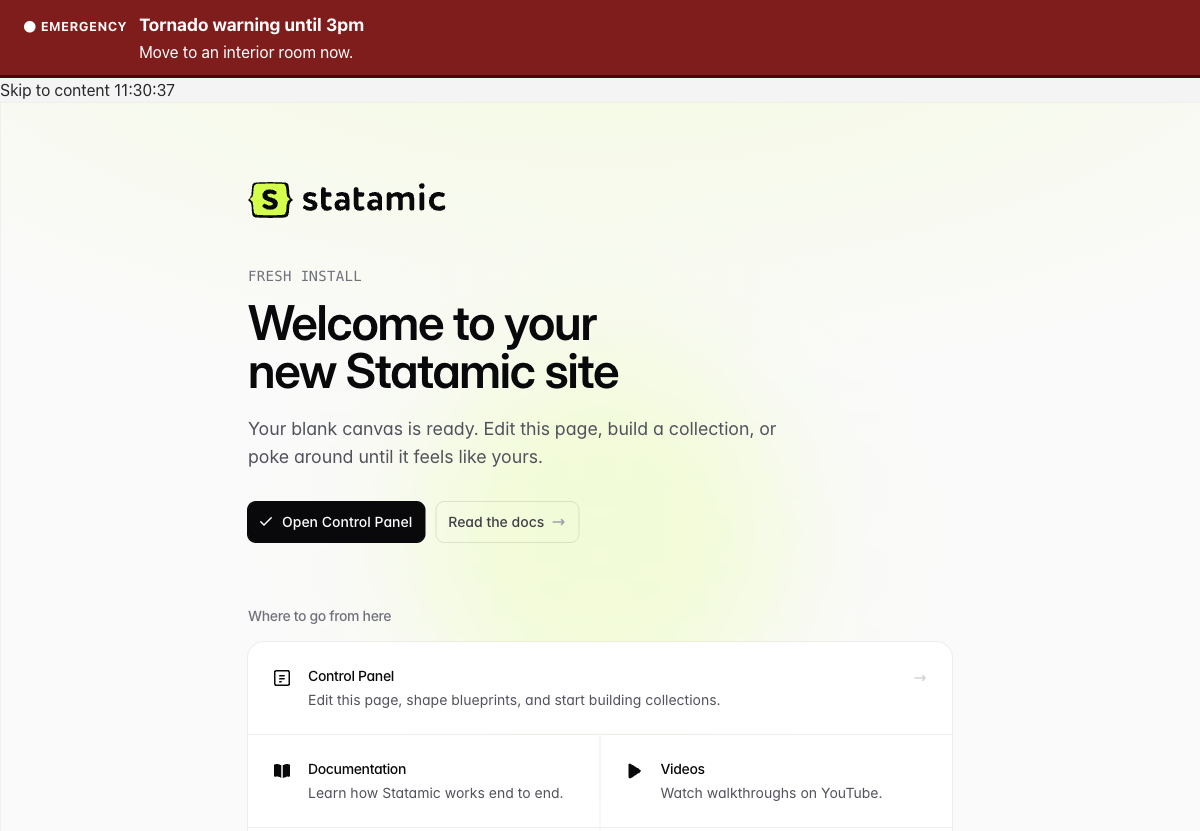
A site-wide alert banner. Alerts are written in a Statamic collection or fed from a remote source, scheduled, graded by severity, aimed at named audiences, accessible, and correct behind static caching.
Statamic 6 and PHP 8.2 or newer. Free, MIT.
Scheduler first
If you use any remote source, Beacon fetches it from the scheduler and never during a page request. Without the scheduler a remote alert never reaches the site. Add this to the server's crontab if it is not there:
* * * * * cd /path/to/site && php artisan schedule:run >> /dev/null 2>&1The Beacon page under Tools in the control panel warns when the scheduler
has not run for five minutes. php please beacon:status exits 1 in the
same case, so a monitor can watch it.
How-to guides
One per source, plus one for the server owner, in docs/how-to, and all of them in one file as DOCUMENTATION.md. Joining a WordPress.com alert site, and running one, is in docs/how-to/wordpress.md. What that feed looks like on the wire is in docs/reference/wordpress-alert-feed.md.
Install
composer require bpmore/statamic-beaconphp please beacon:installThe second command creates an alerts collection with the addon's
blueprint. Then put the tag first inside <body> in your layout, before
the skip link, so a keyboard user reaches an emergency before the skip
target:
<body> {{ beacon }} <a href="#main" class="skip">Skip to content</a> ...The tag prints the banner with its stylesheet and dismiss script inline,
so there is nothing to publish and no second request. Set assets to
linked to serve them from public/vendor/statamic-beacon/dist instead,
or none if your theme bundles its own.
To change the config, publish it:
php please vendor:publish --tag=statamic-beacon-configThe settings screen
Addons, Beacon, Settings in the control panel. Everything in the config file can be set there by the person who runs communications: sources (including a WordPress.com alert site, which needs only its address), this site's audience, the banner's wording and heading level, and preview. Once saved, the screen wins for whatever it fills in; anything left blank still comes from the file. Saving clears the page cache.
The source list starts with "Alerts written on this site". Keep it if alerts from the control panel should keep showing alongside a remote feed. An empty list means the file decides; a "Nothing" block on its own switches the banner off.
Local alerts
Entries in the alerts collection. Each has a title, a severity (info,
warning, emergency), a message (bold, italic and links only), an
optional teaser and Read more link, optional start and end times, optional
audiences, and a dismissible toggle. Emergency alerts default to not
dismissible.
Saving, publishing, unpublishing or deleting an alert clears the static page cache. A scheduled start or end clears it at that moment, so an alert published at 9am to start at noon appears at noon.
Severity
Three levels. emergency beats warning beats info. When a remote
source tags one alert with several, the highest wins whatever order they
came in.
Audiences
An audience is a named group of consuming sites. Set this site's in config:
'audience' => 'clinic','site_audiences' => ['health' => 'clinic', 'intranet' => 'inside'], // multisiteAn alert that names audiences shows only on sites declared as one of them. An alert that names none shows everywhere. Matching is an exact string comparison. Nothing is inferred from a hostname, class name or URL.
Remote sources
sources in the config is an ordered list. Results merge. Each source can
carry max_severity, the highest level it may raise, and audiences, the
only audiences its alerts may reach. So a public weather feed can be
capped at warning and aimed at two sites while your own feed can raise
an emergency everywhere.
| Driver | Reads | Notes |
|---|---|---|
http |
A JSON endpoint through a field map | Defaults match WordPress.com's posts API (a JSONP proxy in front of it works too), so a WordPress.com alert site needs only a URL |
feed |
RSS 2.0 or Atom | Categories carry severity and audience through one pattern, so most publishing platforms work with no adapter |
cap |
Common Alerting Protocol 1.2, XML or the NWS JSON-LD | Only status: Actual renders. Test, Exercise, System and Draft never do |
github |
A file, a Gist, or labeled issues in a public repository | file is the recommended remote source: reviewed, versioned, branch-protected, CDN-served, and not counted against the API rate limit |
null |
Nothing | Switch the banner off without uninstalling |
Every remote driver takes url, poll (seconds between fetches, default
300), timeout (default 5), max_age (how long a stored payload may be
shown after the last successful fetch, default 24 hours), headers, and
teaser_marker (default <!--noteaser-->).
What happens when a feed breaks
An unreachable, slow, malformed or empty feed renders nothing and never
breaks a page. Failures are logged and shown on the Beacon page under
Tools, never to visitors. The last good payload is kept and served until
its ends_at passes, a later fetch replaces it, or it is older than
max_age, after which nothing is shown rather than an alert of unknown
currency. A feed that says it has no alerts is a real answer and clears
the banner; a feed that fails to answer is not, and does not.
Freshness
Poll interval plus the scheduler's one-minute granularity is the worst case from a change at a remote source to a visitor seeing it. With the default poll of 300 seconds that is 6 minutes; the Beacon page shows the number for your config. Measured on a throwaway site: a tick that polls two remote sources and clears the cache takes about half a second, so the budget is the poll interval plus a minute, not more.
Polling clears the page cache only when the alerts changed. Ten polls of
the same feed with a changing cache_age field clear nothing.
GitHub
File mode (recommended) reads raw.githubusercontent.com, which is a
CDN and not counted against GitHub's API limit. Pin ref to a branch. The
file shape is documented in docs/alerts-file.schema.json with an example
in docs/alerts.example.json. GitHub's CDN caches raw files for a short
time on top of your poll interval; measure it for your repository before
promising a number.
Issues mode reads open issues with a label. Labels such as
urgent-clinic carry severity and audience. The title is the alert
title, the body is Markdown (rendered with raw HTML stripped, then
sanitized), and closing the issue ends the alert. Unauthenticated, GitHub
allows 60 API requests an hour per IP address, shared by every site
behind that address; five sites polling every five minutes from one NAT
gateway is exactly 60 and breaks. Beacon sends conditional requests, reads
the remaining count on every response, shows it under Tools, and stops
polling before the limit rather than after. An optional token raises the
ceiling to 5,000 an hour. It is optional on purpose: a required token
expires silently one day and takes the banner with it.
Gist mode reads a public Gist's raw URL. Same properties as file mode, no branch protection.
All three need a public repository or Gist. A private one needs a token.
CAP and the National Weather Service
['driver' => 'cap', 'key' => 'nws', 'url' => 'https://api.weather.gov/alerts/active?point=34.7465,-92.2896', 'headers' => ['User-Agent' => 'yoursite (you@example.org)', 'Accept' => 'application/geo+json'], 'max_severity' => 'warning', 'audiences' => ['campus', 'clinic']],The NWS asks for a User-Agent that identifies you. Severity comes from CAP
severity and urgency together: Extreme, or Severe and Immediate, is
emergency; Severe or Moderate is warning; everything else is info.
Override with matrix. Every alert from a CAP source goes to the source's
audiences, or, for a feed covering several places, geocodes maps each
SAME county code or UGC zone to its own audiences and drops alerts that
carry none of them.
Preview
Open any page with ?beacon-preview=emergency (or warning, info)
while signed in as a user with the "View Beacon previews" permission. The
newest alert, published or not, shows at that severity with a visible
preview marker. Anyone else sees the page as it is. A value outside the
three severities is ignored for everyone. Previews bypass the static
cache in both directions.
Live emergency updates
Off by default. On (settings screen, Preview and scheduler tab, or
fast_path.enabled), a small script on every page asks this site, never
the remote source, for the current emergency alerts every 60 seconds
and shows a new one on the page a visitor already has open, then takes
it down when it ends, whether the script or the server put it there. The endpoint, /!/statamic-beacon/live, serves
what the scheduler last stored, already sanitized, with no-store
headers, and is never written to the static cache. It is only as fresh
as the scheduler.
Injected alerts go into live regions that exist, empty, at page load:
role="status" for information and warnings, role="alert" for
emergencies. The server-rendered banner stays a landmark and is never
inside them, so nothing is announced twice.
Dismissal
The dismiss button is added by the script, keyed in localStorage by
alert id and a fingerprint of its content. Editing an alert changes the
key, so a corrected alert comes back for people who dismissed the old
one. No cookies. Without JavaScript the banner shows and has no dismiss
control.
Accessibility
The banner is a landmark (<section role="region"> named by its heading),
not a live region, because it is present at page load. Its heading is an
h2 by default and can be h2 to h6, never h1. Severity is a visible word,
not only a colour. The Read more link's accessible name includes the
alert title. The stylesheet works with prefers-reduced-motion and
forced-colors: active. Beacon touches nothing outside its own element.
Commands
| Command | Does |
|---|---|
beacon:install |
Create the collection and blueprint |
beacon:tick |
What the scheduler runs each minute |
beacon:fetch [--json] |
Fetch every remote source now |
beacon:status [--json] [--strict] |
Exit 0 healthy, 1 a source is stale or unfetched or the scheduler is late, 2 the command failed. --strict also fails on a failed last attempt |
--json writes only JSON to stdout: php please beacon:status --json | jq .healthy.
Compatibility mode
render.compat emits the structure and class names of the script-tag
client Beacon replaces (.cta-bar, .text-container, .btn-container,
and PREFIX-urgent, PREFIX-alert, PREFIX-fyi with an id of
PREFIX-message, where render.compat_prefix is whatever the old
banner's classes started with) so an existing stylesheet keeps working
during a migration. It is a migration aid, off by default, and not a
long-term mode.
What Beacon does differently from the client it replaces
| Legacy client | Beacon |
|---|---|
Feed HTML through innerHTML, unsanitized |
Server-side sanitize with an allowlist |
| JSONP with an echoed callback name | Server-side fetch; a JSONP wrapper is read as text, never run |
| Substring class sniffing for audience | Explicit configured value, exact match |
| Last matching category wins | Defined severity precedence |
| Test mode open to anyone with a URL | Authenticated, permissioned, allowlisted |
| Test mode value written to a class unescaped | Validated against an enum |
Injected <h1> on every page |
Configurable, defaults to h2 |
| Inline body styles and background-position shift | No side effects outside the banner |
| Stylesheet loaded from a remote host | Bundled, inline or published |
console.log on every page load |
None |
| Implicit globals, throws under strict mode | One strict-mode script, nothing global |
What Beacon does not do
Not a notification system. Not a cookie banner. Not a modal, ever. Not a control panel notification. Not an authoring tool for a remote source: Beacon consumes feeds, it does not publish to them. No polling of the remote source from the browser, ever: the optional live update asks this site only.
A note on where the feed lives
A common arrangement routes the alert feed through a proxy on the institution's own main web server, so the banner that would announce that server's outage is served by that server. Beacon consumes what it is pointed at and cannot fix that by itself. Point it at a source hosted independently of the consuming sites, or run a source chain where at least one entry is.
Support
Issues and pull requests at github.com/bpmore/statamic-beacon. This is a free addon maintained alongside Had A Farm's other Statamic addons; there is no support agreement.