
Not a page builder. You cannot move a block, add a section or change a layout with it, and that is on purpose. It exists for the change a client actually asks for: one wrong word in a headline, a phone number, a sentence in an intro. The kind of change that today means finding the login, finding the entry, finding the field, and hoping nothing else got touched.
Requirements
| Statamic | 6.0 or newer |
| PHP | 8.2 or newer |
| Laravel | 12.40 or newer, or 13 (whatever Statamic 6 pulls in) |
| Content | Entries. Globals, taxonomy terms and users are not supported yet |
| Control panel | Must be framable from the site's own origin for the overlay. Switch control_panel off if it is not |
| Fieldtypes | text, textarea, integer in place; toggle, select, date and markdown through a control; the rest through the control panel |
| Statamic Pro | not required. Collections with revisions enabled are refused, and revisions are Pro |
| JavaScript | required in the editor's browser. Visitors need none |
Installing needs no Node and no build. Two of the three shipped files are hand-written; the third, the rich editor, is bundled here and committed, and CI fails if it drifts from its source.
What it looks like
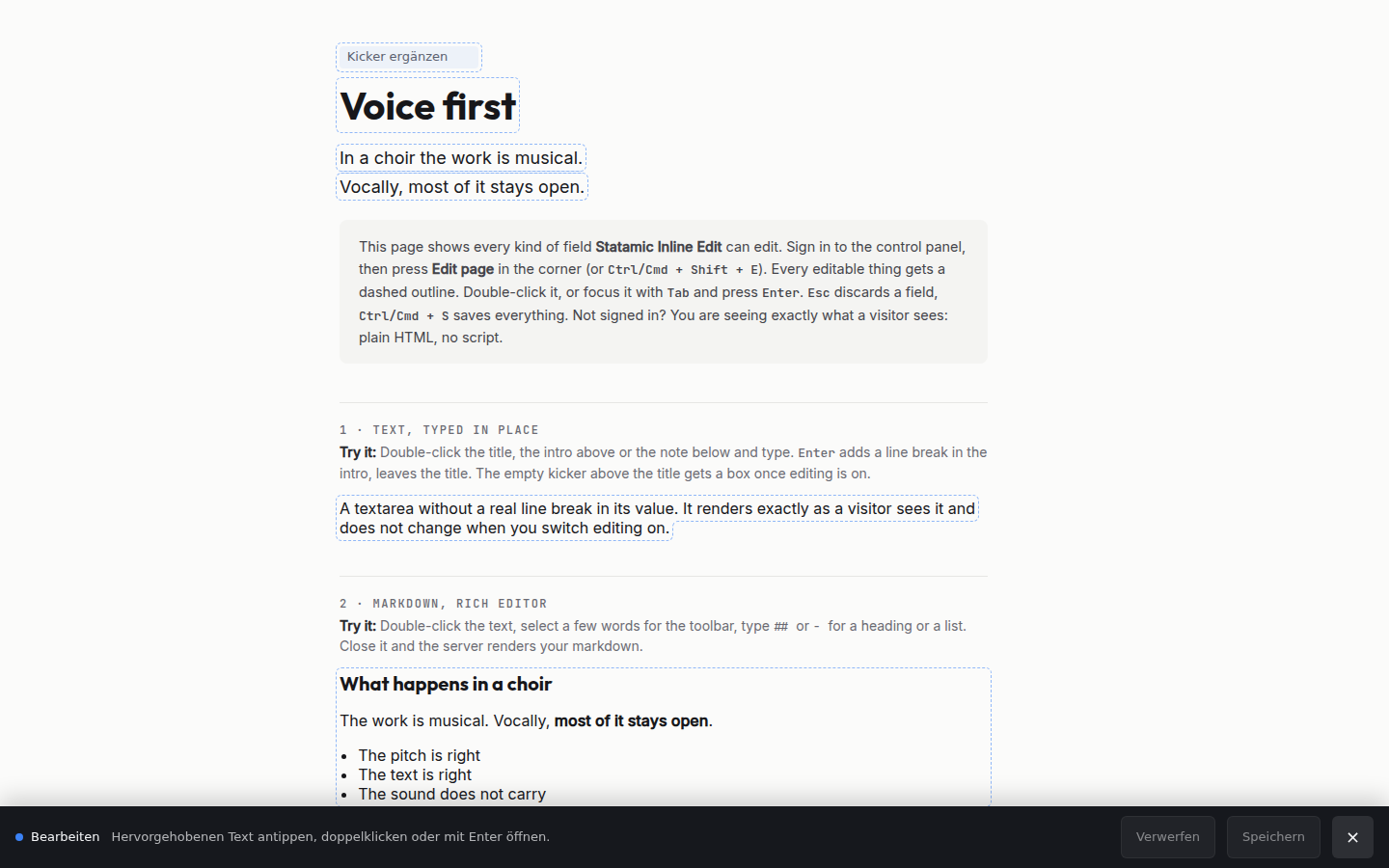
A signed-in editor gets one small button in the corner. Press it, or Ctrl/Cmd + Shift + E,
and a bar docks at the bottom: every marked field picks up a dashed outline, and a double-click
opens whatever that field needs. A cursor in a headline. A switch on a toggle. A real editor in
the text itself for markdown, with a toolbar that appears over the selection. The control panel
over the page for everything else. Close the bar and the page is a page again.
Everyone else sees exactly what they saw before: same HTML, no wrapper elements, no script, no attributes. There is nothing to leak because for a visitor nothing is rendered.
 |
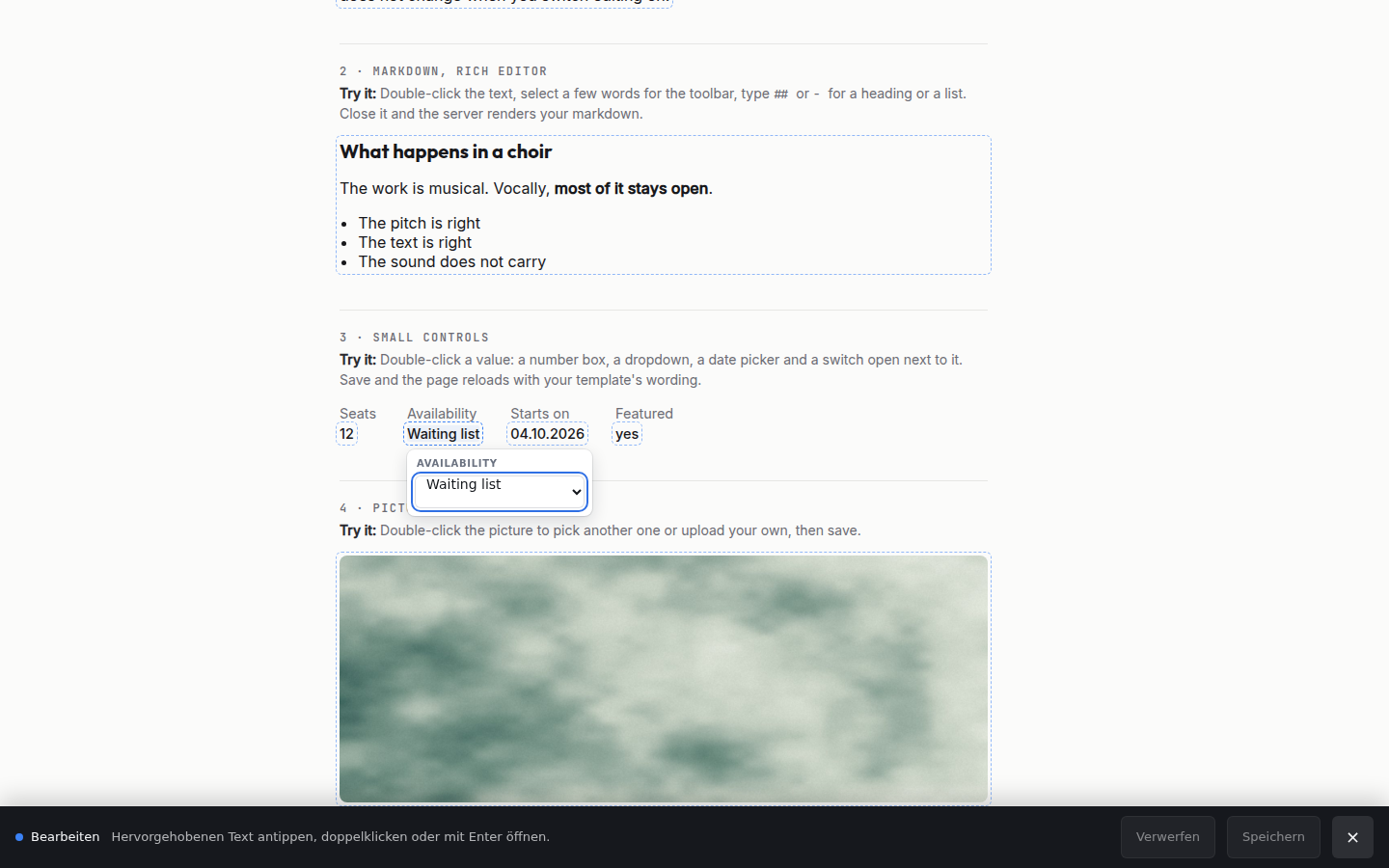 |
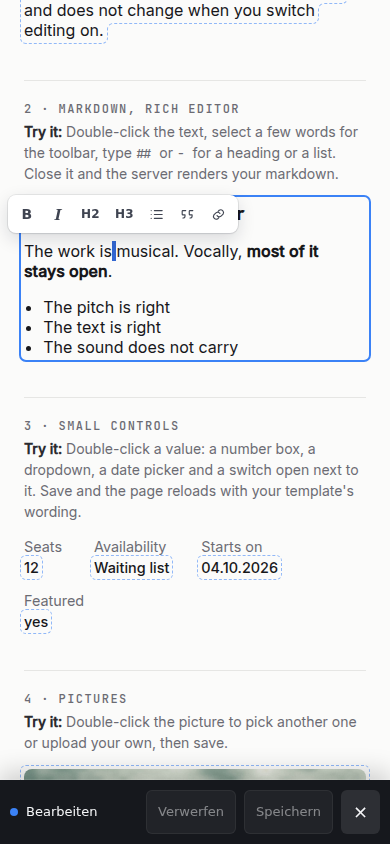
| Edit mode on. Only marked fields get an outline. | A control. The value is not on the page, so a real one appears. |
  |
|
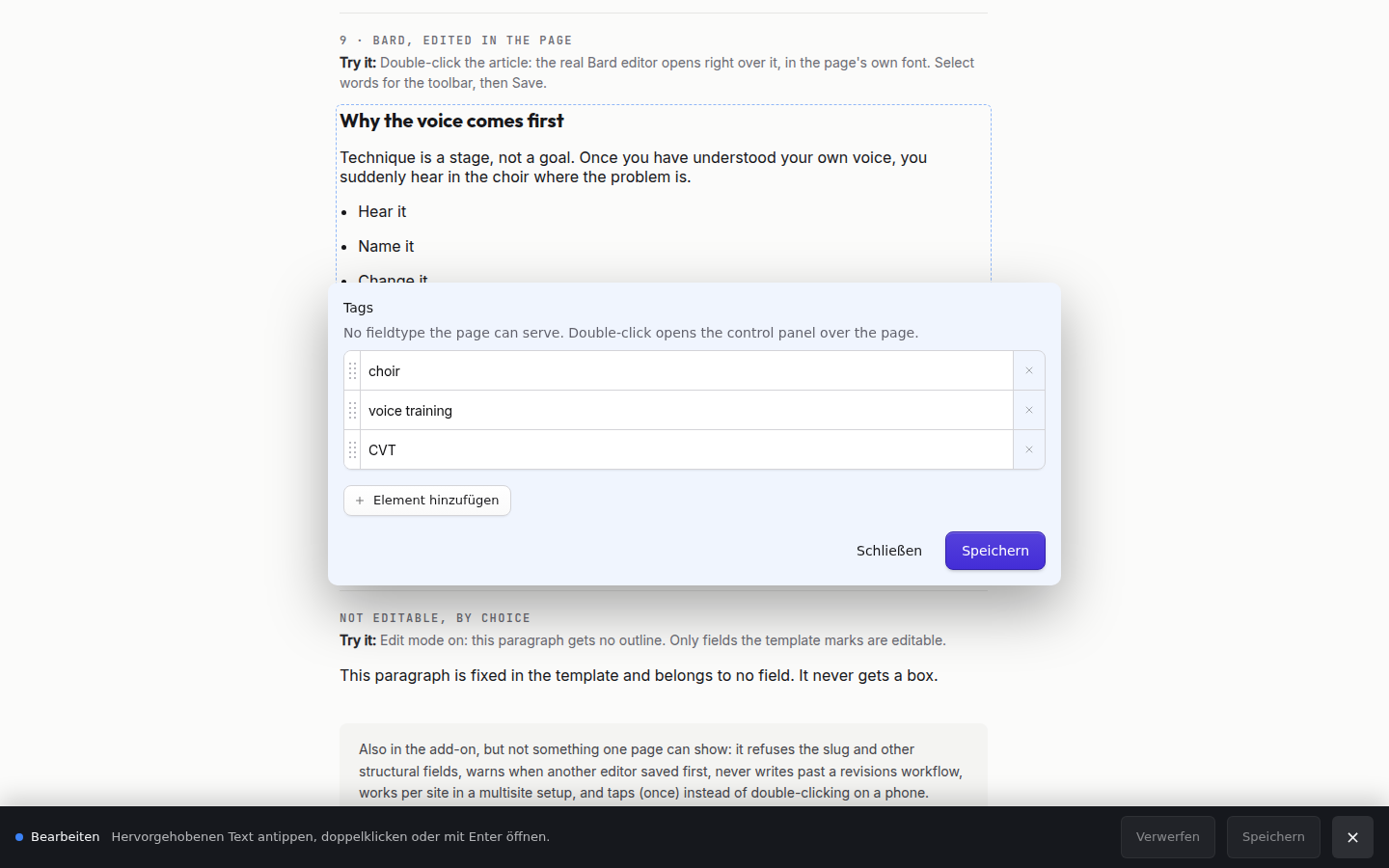
| The control panel, in an overlay. For Bard, Replicator and assets. | On a phone. One tap opens, because a double-click is a mouse gesture. |
All five images are from the public demo, demo.adriangoldner.dev/inline-edit. There is no dark-mode pair: every surface this addon has is somebody else's page, in their colours.
Install
composer require goldnead/statamic-inline-editThat is all on a standard Statamic site. Its composer.json runs php artisan statamic:install
after every composer install and composer update, and that publishes this addon's files with
--force: the stylesheet and the script for the public page, and the control panel bundle.
If your site does not run statamic:install from Composer, run the publish yourself, on every
deploy:
php artisan vendor:publish --tag=statamic-inline-edit --force--force is not optional. The files are served from public/vendor/statamic-inline-edit/, and a
stale copy there is an editor talking to a newer save route, which fails in a way nobody can
reproduce. Without the control panel bundle, every control panel page fails on the missing Vite
manifest. The older --tag=statamic-inline-edit-assets still publishes the front-end files on
their own.
Use
Take any field you want editable and wrap the output:
{{ hero_title }} → {{ editable:hero_title }}That is the whole integration. Do it for the handful of fields clients actually ask you to change; leave the rest alone.
<h1>{{ editable:hero_title }}</h1><p>{{ editable:intro }}</p> {{-- when the field name is itself a variable --}}{{ editable field="{field_handle}" }} {{-- the wrapper is a <span> unless you say otherwise --}}{{ editable:intro tag="div" }}Why the tag, and not magic
Because Antlers cannot be asked afterwards. By the time a rendered value reaches the output buffer it is a plain string; the object that knew its field handle and its entry has already been reduced away, and the runtime offers no hook in between. On top of that, a value inside a Bard or Replicator set has no link to its entry at all, by construction in core.
So the field gets named in the template. Every comparable tool in every CMS does this, for the same reason.
What can be edited
Five kinds of field, five different things happen. Which one a field gets is decided by its
fieldtype, in config/statamic-inline-edit.php.
| Fieldtypes | Double-clicking it | |
|---|---|---|
| text | text, textarea, integer |
The text itself opens. What you type is what the page will show. |
| control | toggle, select, date |
A small control opens. The value is not the text on the page, so there is nothing to put a cursor in. |
| source | markdown |
The text becomes a real editor, in place. Markdown shortcuts as you type, a toolbar over the selection. |
| inline | bard |
The real control panel field, put over the block it belongs to, in the page's own type. |
| cp | everything else | That one field opens as a control panel publish form, in a panel over the page. |
Only text keeps what you typed on the page as you typed it. The other four reload the page after saving, because only the server knows what the template will make of the new value.
Why each one is the way it is
text is the original: what travels back to the server is the browser's innerText, never
innerHTML, so no markup a contenteditable produces can reach your content.
control needs the pair form, because the tag cannot produce the visible output itself:
{{ editable field="promoted" }}{{ if promoted }}Läuft{{ else }}Pausiert{{ /if }}{{ /editable }}{{ editable field="starts_on" }}{{ starts_on format="d.m.Y" }}{{ /editable }}A select's choices come from your blueprint, and the save route checks the arriving value against them again. The dropdown in the browser is a suggestion; the request is what happened.
source turns the text on the page into the editor. Not a box over it, not a copy of it: the
same heading, the same measure, the same font, now with a cursor in it. Type ## and it
becomes a heading, - a list, **bold** bold as you close the asterisks. Select a few words
and a small toolbar appears over them.
It is Tiptap, which is also what Statamic's own Bard is built on, so the shortcuts and the behaviour are the ones your clients already meet in the control panel. It is fetched the first time somebody opens such a field, 180 KB, and never on a page nobody is editing.
What it costs. A rich editor reads markdown into a document and writes it back out, and
markdown has more than one spelling for the same document: *a* may return as _a_, a
reference link as an inline one. Editing one sentence rewrites the whole field in the editor's
dialect. Opening a field and closing it without typing never writes anything, because the
comparison is against what the editor produced on mount rather than against what was stored.
But if you have markdown that has to come back byte for byte, hand-written tables, HTML blocks,
footnotes, set rich to false and you get the plain source editor instead.
inline is the same real control panel field as cp, put over the block it belongs to rather than on a card in the middle of the screen. It is for the field that holds the article. A Bard is not a field on a page, it is the page — on a card it has a different column width, a different typeface and a different measure, and you cannot see what you are writing.
The block keeps its box and stops being drawn; the frame goes over it and paints nothing of its own. The page reads exactly as it did, because as far as the page is concerned nothing changed. The typography is measured, not approximated: the page reads the computed style of the element you double-clicked and of one probe for each kind of block a Bard can make, and hands the result to the editor. Your stylesheet is never loaded into the control panel, which would put your reset through its interface.
The font is the page's own file, not the control panel's copy of the same family. Two builds of
a typeface do not have the same advances, and over a line that is a word moving to the row
above — so the @font-face rules the page really loaded travel with the typography, renamed,
and where they cannot be read (a stylesheet from another origin, which is how most sites load
Google Fonts) the frame asks that stylesheet for itself.
Everything a control panel draws to tell one field from the next comes off — the box, the label, the instructions, the editor's padding and background, the focus ring.
The toolbar comes with the selection. In place the field is opened in Bard's floating mode, whatever the blueprint says: select a few words and the buttons appear over them, let go and they are gone. The blueprint's own setting is left alone, because it answers a different question — how the field should look in the control panel, where a docked toolbar is right. Save and Close keep a strip under the text; they have to be reachable the whole time, and the page makes room for exactly that strip. The page's own bar steps aside while the field is open.
Two things to know. The frame covers that strip's worth of space, and a click there does not reach the page: an iframe cannot let a click through part of itself. And the block keeps the height it had, so the page does not reflow while the text grows — the frame covers more of what is under it, and the reload after saving puts it right.
Put the marker on the element that holds the text, not on a wrapper around it. The frame goes over the marked element's outer box, and the text in it starts at the frame's edge. On a card or a column with padding, the page's text starts that padding further in, so the open editor sits off the page's lines by exactly that much. Mark the inner element, the one whose edges are the text's edges:
<article class="card p-8"> {{ editable:content tag="div" }}</article>Add or remove fieldtypes in inline. An entry under revisions gets the card instead, for the
same reason it always did.
cp is the real control panel field in an iframe, not a rebuilt editor. Bard alone is an entire editor and an asset picker is an entire browser; a second-rate copy of either is worse than the real one. What opens is a panel holding that one field and nothing else — the real fieldtype, its real metadata, its whole toolbar — and saving runs through the blueprint's own validation and permissions. The page reloads when you close it.
Entries on a collection with revisions are the exception: writing one field past a working copy would publish straight to the site. Those open the whole entry form instead, which knows how to make one, and they open scrolled to the field you double-clicked.
Seeing it before you save it
The three non-text kinds cannot show the result in place: only your template knows what a toggle reads as, and only the server knows what markdown renders to. So:
- A control shows what the field will become next to what it still says, and the page reloads after saving so the template has the last word.
- A markdown field is rendered by the server the moment you close the editor, through the same fieldtype the page uses. What you see there is what will be there. Nothing is written until you press Save.
The slug is refused outright and cannot be enabled. Changing it moves the page out from under the person editing it and breaks every link to it.
Don't chain modifiers onto it
{{ editable:title | upper }} {{-- wrong --}}The modifier runs on the tag's whole output, wrapper and all, and the editor would then save
the uppercased text back as the stored value. Put modifiers on a plain {{ title }} somewhere
that is not editable.
Who may edit what
Core's own entry policy, unchanged. If someone cannot edit a page in the control panel, no marker is rendered for them here and the save route refuses them. There is no separate permission to forget to grant, and no way for this addon to be more permissive than the CP it sits next to.
Every request is checked again server-side: the entry exists, this user may update it, the handle is a real field on its blueprint, its fieldtype is on the list, the text is within the length ceiling, the entry has not changed since the page loaded, and the blueprint's own validation passes. The markers in the HTML say what the server offered, but a request says what a browser sent, and those are only the same thing until somebody opens the console.
Two people at once
Every marker carries the entry's modification time as the page saw it. A save that arrives with a stale one is refused with a 409 and the message says to reload. Nobody's work disappears quietly.
Static caching
Read this if you have static caching switched on. There are two halves and only one is solved.
Writing is safe. A page that rendered markers is marked X-Statamic-Uncacheable, so an
editor's version of a page, complete with their CSRF token, is never stored and never served to
a visitor.
Reading is not. With full-measure caching, the cache answers before this addon is reached,
so an editor can be handed a stored visitor page with no markers on it. Use core's
{{ nocache }} around the editable regions, or exclude the URLs your clients edit. This is
written down rather than papered over, because a marker that appears unreliably is worse than
one that is reliably absent.
Configuration
php artisan vendor:publish --tag=statamic-inline-edit-config| Key | Default | |
|---|---|---|
enabled |
true |
Off means the tag renders the plain value, no script is injected, and the save route answers 404. |
fieldtypes |
text, textarea, integer |
Edited in place. Every one of them has to store a plain string; see above. |
controls |
toggle, select, date |
Edited through a small control. |
source |
markdown |
Edited in place with a real editor. |
rich |
true |
The editor for those. false gives the plain markdown source in a monospace box instead. |
inline |
bard |
The real control panel field, opened over the block instead of on a card. |
control_panel |
true |
Everything else opens the control panel in an overlay. Off means those fields are simply not clickable. |
middleware_groups |
statamic.web |
Which route groups the editor rides on. A site that serves its own pages adds web. |
inject_for_signed_in |
false |
Place the editor on every page a signed-in user opens, not only on pages with a marker. For a site whose pages are drawn client-side. |
multiline |
textarea |
Of the text ones, where Enter inserts a line break instead of leaving the field. |
inject |
true |
Places the editor before </body> automatically. Switch off and use {{ inline_edit:assets }} if a Content Security Policy needs the script somewhere specific. |
max_length |
100000 |
A ceiling on any one field, independent of the blueprint. |
Two routes are registered under the action prefix: save, which writes, and preview, which
renders a markdown value through its own fieldtype and writes nothing. Both check the same
permission as the control panel, and both answer 404 when enabled is off.
A front end that is not Antlers
A Statamic site is not always Antlers. The content stays, the control panel stays, and the pages are drawn by React through Inertia, by Blade, or by a front end of its own. There is no template to put a tag in, so ask for the marker directly:
use Goldnead\StatamicInlineEdit\InlineEdit; return Inertia::render('Site/ArticleDetail', [ 'article' => $article, 'edit' => [ 'title' => InlineEdit::marker($entry, 'title'), 'content' => InlineEdit::marker($entry, 'content'), ],]);<h1 {...edit.title}>{article.title}</h1><div {...edit.content} dangerouslySetInnerHTML={{ __html: article.content }} />In Blade, InlineEdit::attributes($entry, 'content') gives the same thing as an escaped
attribute string.
It is the same decision the tag makes, from the same place — the same permissions, the same refusals, the same fieldtype handling. An empty array is the normal answer, because it is what every visitor gets, and an element that spreads an empty array is byte for byte the element it was.
Two things such a site has to do that an Antlers site does not.
Name its own route group.
'middleware_groups' => ['statamic.web', 'web'],Pages your controllers serve are in web and never in statamic.web, so without this nothing
injects the editor there and nothing marks those responses uncacheable. Naming both is safe —
Statamic's own frontend controller adds statamic.web on top of web, so its pages pass
through twice, and the second pass leaves the script it finds alone.
Put the editor on every page.
'inject_for_signed_in' => true,Because a new page is not a new request. Going from a list to an article is a fetch that returns JSON, nothing is injected into it, and the markers that arrive with it would have no script to act on them — the page looks editable and double-clicking does nothing, silently. With this on, the script is already there when they appear, and shows nothing on a page that has none. The price: the script carries a CSRF token, so every page a signed-in user opens is marked uncacheable. On a site whose pages Statamic does not serve, that costs nothing.
The editor watches the document and takes in markers as they arrive, so a client-side navigation needs nothing from you. Two things your router can ask anyway:
window.StatamicInlineEdit.rescan() // I just changed the pagewindow.StatamicInlineEdit.dirty() // how many fields have unsaved text in themdirty() matters. On such a site, leaving a page is a navigation and not an unload, so the
browser's own "you have unsaved changes" never fires and three rewritten paragraphs go with it
without a word. In Inertia:
router.on('before', (event) => { if (window.StatamicInlineEdit?.dirty() && ! confirm('Unsaved changes. Leave anyway?')) { event.preventDefault(); }});InlineEdit::active() answers whether this request has a marker on it at all, and
InlineEdit::assets() gives the markup for a layout that places the script itself.
Text the page draws differently: a small window
Some text cannot be typed into where it stands, because the page shows it changed: a headline built from two cells, a sentence with a link in the middle, a word the component turns into emphasis, a quote it wraps in quotation marks, the same label in six places. Typed into, the element would save the drawing over the value. For those, ask for a window:
'heroMarker' => InlineEdit::popup($entry, [ 'rows.'.$line1['id'].'.text' => 'Line 1', 'rows.'.$line2['id'].'.text' => 'Line 2',], 'Hero headline'), 'quoteMarker' => InlineEdit::popup($testimonial, ['quote' => 'Quote', 'author_name' => 'Name']), // one cell'lead' => InlineEdit::cell($entry, 'rows', $row['id'], 'text', 'Lead', popup: true),A double-click opens a small window over the element with one box per value, holding the value
as it is stored. Only the boxes that changed are saved, through the same route and the same
gates as any text, and the page reloads so your component draws them its own way. Addresses
are field handles or cells (grid.rowId.column) of one entry, plain text only; one that is not
writable as text refuses the whole marker, so the window never shows less than the element
does. A click on a link inside such an element does not follow it while editing is on.
InlineEdit::supports('popup') tells a site which version it runs on.
Not in this version
Named, not hidden:
- A paragraph inside a Bard or a Replicator set. Core builds those values without a link back to their entry, so a single paragraph inside a set is genuinely unaddressable from the page. The whole Bard opens instead, over the block it belongs to.
- Revisions. A collection with revisions enabled refuses the save on the page and says so, rather than writing straight past a workflow whose whole point is that somebody approves first. Its fields are still reachable through the control panel overlay, where revisions work as they should.
- Globals, taxonomy terms and users. Entries only. All three reach a template as augmented values too, but each needs its own way of being found again on save, and rendering a marker we cannot save is worse than rendering none.
- Multisite works, with one thing to know: editing a field on a localized entry writes into that localization, so the field stops inheriting from its origin. That is what the control panel does once you localize a field there.
Line breaks in a textarea
A textarea can hold line breaks that your template does not render, because normal HTML
collapses them into spaces. An editor who cannot see them deletes them on the first save
without ever knowing they were there, so a field whose stored value really has breaks in it is
rendered with pre-wrap and shows them.
Two things follow, both deliberate:
- Only fields that actually contain a break. A textarea holding one paragraph renders exactly as a visitor sees it, because there is nothing hidden to reveal.
- From the first paint, not when you switch editing on. Nothing re-wraps under you when you press the toggle. The page an editor reads is the page they edit.
Where the two do differ, it is because the content has breaks that plain HTML swallows. If you
would rather they showed for visitors too, that is a | nl2br on your template, not a setting
here.
The bar
It docks across the bottom of the window and reserves matching space at the end of the document, so it covers none of your page. It cannot get out of the way of another fixed overlay, though: a cookie dialog or a chat bubble pinned to the bottom corner will share that strip with it. No bottom bar anywhere solves that. Switch editing off and the bar is just the one toggle again.
Keyboard and touch
| Ctrl/Cmd + Shift + E | show and hide the bar |
| Double-click, or a single tap on a touch screen | start editing |
| Enter / Space on a focused field | start editing, without a mouse |
| Escape | discard this field |
| Enter | leave the field (single-line fields) |
| Cmd/Ctrl + S | save everything |
A single tap only opens a field while edit mode is on, which the person switched on one tap earlier. Reading the page is never interrupted.
Development
composer installvendor/bin/phpunit # 35 tests: the tag, the save route and the preview routevendor/bin/pint --testvendor/bin/phpstan analyse npm installnpm run build # resources/js/rich.js -> resources/dist/inline-edit-rich.jsnode tests/browser/run.mjs # 113 checks: everything that only exists in a browserresources/dist/inline-edit-rich.js is committed, because a site that installs this addon gets
no build step. The bundle job in CI rebuilds it and fails on a diff, so the file in the
repository is always the file the source produces. npm run watch rebuilds while you work.
The two suites answer different questions and neither covers the other. PHP proves the
server: who may write, to which field, with what validation, and what happens when two people
collide. The browser run drives the shipped script against tests/browser/fixture.html — no
Statamic, no PHP — for double-click to edit, the dirty count, Escape reverting, the exact shape
of the save request, and the bar surviving a host stylesheet that styles every button on the
page.
node tests/browser/run.mjs --shot out.png writes a screenshot of the editor mid-edit.
inline-edit.js and inline-edit.css are hand-written vanilla with no build step, and should
stay that way: the launcher, the bar and the save are a contenteditable and a fetch, a
toolchain would buy nothing there, and those two files load on every page an editor opens.
inline-edit-rich.js is the one exception and the reason there is a build at all. A WYSIWYG
that understands markdown shortcuts is not something to hand-roll, it is loaded only when
somebody actually opens such a field, and Statamic's own Bard is Tiptap too.
Support
Only the latest version is supported. Bugs and questions go to GitHub issues.
Licence
Proprietary. See LICENSE.md.