
Statamic Video Tools


Features • Installation • Quick Start • Documentation • Support
A complete video toolkit for Statamic. Upload a video and get optimized MP4, WebM, AV1, HEVC, and HLS outputs, with automatic poster generation, animated CP thumbnails, and AI transcription with subtitles. Powered by locally installed FFmpeg and whisper.cpp. No third-party services, no monthly fees, no data leaving your server.
Most video solutions require a third-party transcoding service with a monthly subscription. This addon does everything locally: encoding, poster extraction, CP thumbnail injection, and AI transcription.
- Modern formats and adaptive streaming. AV1, HEVC, VP9, H.264, and HLS adaptive bitrate out of the box — the same video stack used by streaming platforms, without the platform dependency.
- AI transcription and subtitles included. Auto-generate captions in multiple formats using a local AI model. No cloud speech API, no extra cost per transcription.
- No subscription fees. Pay once (addon license) and encode unlimited videos. No per-minute charges, no storage fees, no cloud bills growing with your audience.
- Your videos stay on your server. No video data is sent to third-party services. Full control over your files, your storage, and your users' privacy.
Features
Encoding & Conversion
- Multiple output formats from a single upload — MP4, WebM, HLS, and more
- Modern codecs — H.264, AV1, HEVC out of the box; VP9 supported via custom presets
-
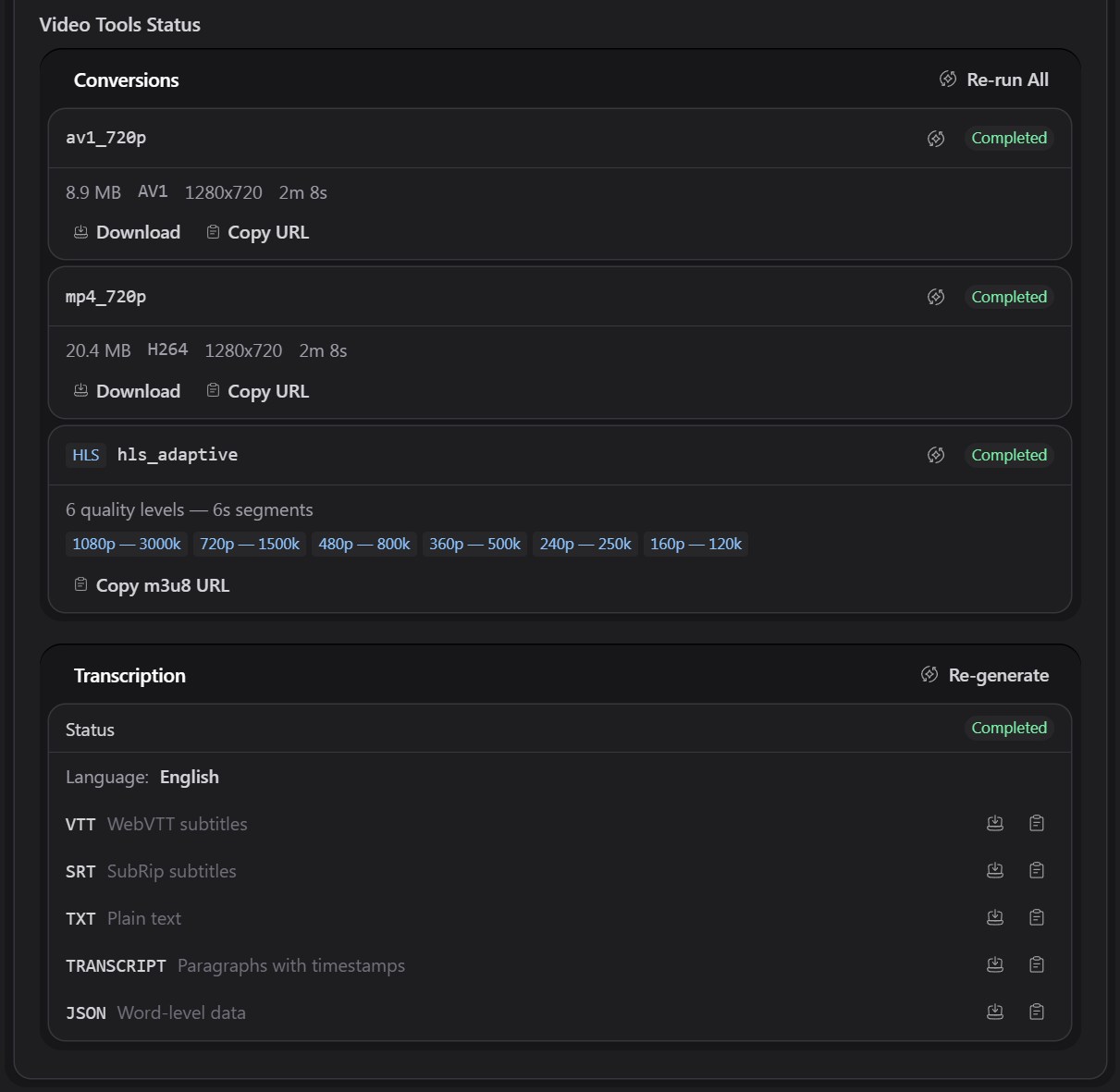
HLS adaptive streaming — multi-quality
.m3u8playlists with.tssegments, each preset in its own subdirectory - Alpha channel support — transparent video via HEVC and AV1 with proper conditions
- Conditional encoding — skip presets based on resolution, codec, alpha presence, or any custom logic
-
Full FFmpeg control — pass raw FFmpeg flags, or implement a
PresetHandlerclass for complex workflows - Per-container configuration — different preset sets for different asset containers
AI Transcription (powered by whisper.cpp)
- Automatic transcription on upload using whisper.cpp, a standalone local binary with no Python or cloud API required
-
Multiple output formats generated in a single pass:
-
.vtt— WebVTT subtitles, automatically injected as<track>in the{{ video }}tag -
.srt— SubRip format for video editors and external players -
.txt— clean plain text transcript, no timestamps -
.transcript.txt— formatted paragraphs with[H:MM:SS]timestamp markers, ready for front-end display -
.json— full word-level data with confidence scores for custom search or highlighting experiences
-
- Automatic language detection — or pin a specific language in config
-
{{ video }}tag +<x-video>Blade component —<track kind="subtitles">rendered automatically; all transcript URLs available as template variables -
Vocabulary hints — improve recognition of brand names and proper nouns via
prompt,prompt_fields(auto-uses asset alt text), or a customPromptResolverclass - CP fieldtype panel — shows transcription status, detected language, per-format download and copy-URL buttons, and a generate/re-generate button
- Choose your model — tiny (fastest, ~75MB) through large-v3 (most accurate, ~3GB); download via artisan command
Poster & Thumbnail Generation
- Automatic poster extraction — a JPEG frame is pulled from the video at a configurable point and stored alongside the converted files
-
{{ video }}tag integration — the poster is used as theposterattribute automatically, with optional Glide resizing via tag parameters - CP asset browser thumbnails — poster frames are injected into the Statamic CP so videos show a real image instead of a broken placeholder
- Animated WebP thumbnails (optional) — generate a short looping preview clip for the asset browser, created entirely by FFmpeg with no dependency on ImageMagick
Control Panel Integration
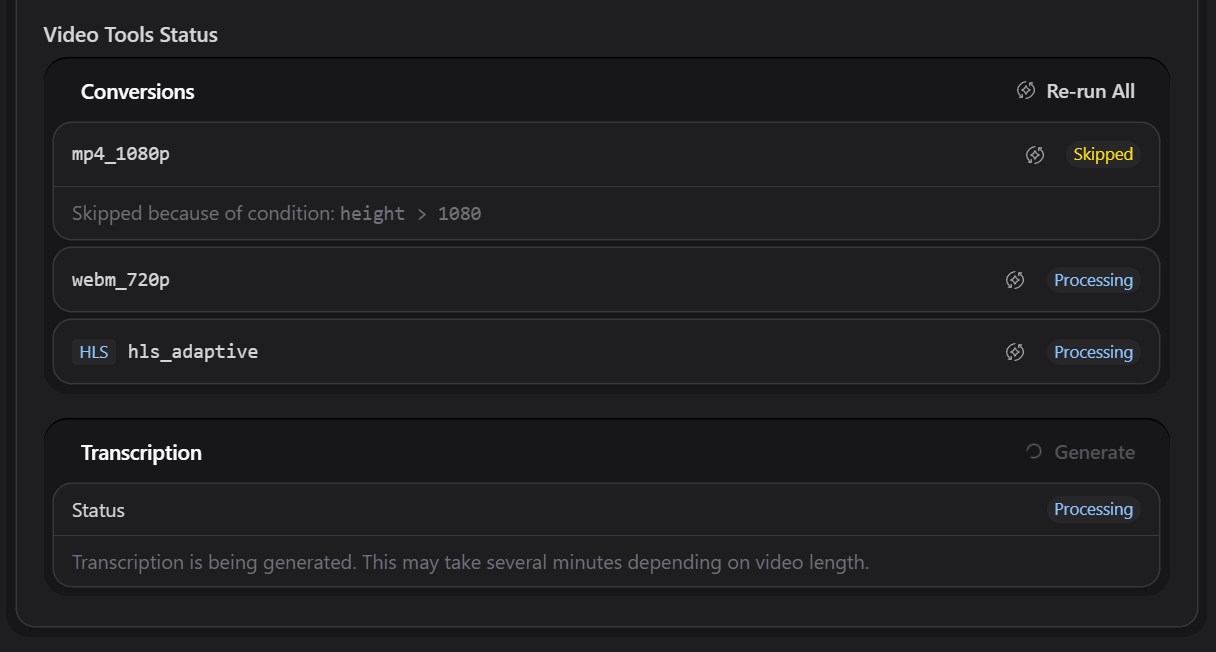
- Conversion status fieldtype — add it to any asset blueprint to see per-preset status (Not Started, Pending, Processing, Completed, Failed, Skipped) directly in the asset editor
- Live status updates — the fieldtype polls automatically while jobs are running, updating in real time without a page refresh
- Re-run from the CP — re-queue individual presets or all conversions with a single click
- Skipped preset details — when a preset is skipped due to a condition, the exact condition and asset value are shown
- Asset listing column — add the fieldtype as a column in the assets browser for a quick at-a-glance status indicator with a hover popover showing per-preset details
Developer Experience
- Queued processing — all jobs run as background queue workers via Laravel Horizon or any queue driver
- Artisan commands — download FFmpeg and whisper.cpp binaries, batch-process existing assets
- Detailed logging — per-job debug and error logs for every step
-
{{ video }}Antlers tag +<x-video>Blade component — both produce identical output; use whichever fits your template stack - Publishable templates — customize both the Antlers and Blade views by publishing them
- Asset deletion cleanup — conversion files, posters, thumbnails, and transcripts are automatically deleted when an asset is removed from the CP
-
Events —
VideoConversionCompletedandVideoAssetProcessedLaravel events for downstream automation (static cache clearing, notifications, etc.)
Screenshots
Processing — live status polling as jobs run, with per-preset re-run controls:
Completed — full conversion details, HLS quality levels, and all five transcription formats with download and copy-URL actions:
Installation
composer require eminos/statamic-video-tools
Publish the config file:
php artisan vendor:publish --tag=statamic-video-tools-config
Download FFmpeg and point your .env to it:
php artisan video-tools:download-ffmpeg
# Add to .env — use the absolute path to your project's storage directory

FFMPEG_BINARIES=/var/www/your-site/storage/app/ffmpeg/ffmpeg


FFPROBE_BINARIES=/var/www/your-site/storage/app/ffmpeg/ffprobe
If FFmpeg is already installed system-wide (
which ffmpegreturns a path), skip the download and the.envstep — the defaults work automatically.
Optionally, download whisper.cpp for AI transcription (Linux requires cmake and build-essential):
php artisan video-tools:download-whisper


php artisan video-tools:download-whisper --model=small  # better accuracy
Quick Start
1. Configure a container in config/video-tools.php:
'containers' => [


    'assets' => [


        'presets'       => ['av1_1080p', 'mp4_1080p'],


        'transcription' => false, // override per-container; or omit to inherit global setting


    ],


    'talks' => [


        'presets'       => ['av1_1080p', 'mp4_1080p'],


        'transcription' => true,  // always transcribe videos in this container


    ],

],
2. Enable transcription (optional):
'transcription' => [


    'enabled' => true, // global default; overridable per container above


    'model'   => env('WHISPER_MODEL', storage_path('app/whisper/models/ggml-base.bin')),

],
3. Add the status fieldtype to your asset blueprint in the Statamic CP blueprint editor. Search for "Video Tools Status".
4. Use the video tag in your Antlers templates:
{{# Self-closing: renders full <video> with sources, poster, and <track> automatically #}}

{{ video :asset="hero_video" autoplay muted loop playsinline class="w-full" }}


{{# With poster resizing #}}

{{ video :asset="hero_video" controls poster:width="1280" poster:quality="85" }}


{{# HLS adaptive streaming #}}

{{ video :asset="talk_video" hls controls }}


{{# Pair tag: build your own markup with access to sources, poster, and transcript #}}

{{ video :asset="talk_video" }}


    <video controls poster="{{ poster_url }}">


        {{ sources }}<source src="{{ url }}" type="{{ type }}">{{ /sources }}


    </video>


    {{ if transcript.html }}


        <div id="transcript">{{ transcript.html | raw }}</div>


    {{ /if }}

{{ /video }}
5. Upload a video. Conversions, poster, thumbnail, and transcription all run automatically in the background.
Documentation
Complete technical reference is available in DOCUMENTATION.md:
- Configuration
- Presets
- Poster & Thumbnail Generation
- AI Transcription
- The
{{ video }}Tag - HLS Streaming
- CP Fieldtype
- Artisan Commands
- Asset Metadata Structure
Requirements
- PHP 8.3+
- Statamic 6.x
- FFmpeg and FFprobe (download via artisan)
- whisper.cpp binary + model (download via artisan, transcription only)
- A queue worker (Laravel Horizon recommended) for background processing
Features Ideas
Features being considered for future releases.
-
Transcript translation — translate generated transcripts into other languages. Whisper can translate audio directly to English via
--task translate, but translating to arbitrary languages (e.g. Swedish → French) requires an external service such as DeepL or OpenAI. The translated VTT/SRT files would be stored alongside the originals and exposed via the tag as additional<track>elements with their respectivesrclangattributes. - Transcription editor — view and edit transcription files directly in the CP asset editor. Includes a find & replace tool that applies corrections across all five output formats (VTT, SRT, TXT, transcript, JSON) simultaneously, plus a per-file free-text editor for manual tweaks.
- Video clipping — extract a time range from any video into a new Statamic asset via an artisan command or CP action. Powered by FFmpeg, with no re-encoding required.
-
Audio normalization — optional loudness normalization during encoding via FFmpeg's
loudnormfilter. Ensures consistent audio levels across all encoded outputs regardless of the source recording. -
Thumbnail at timecode — generate a poster image from a specific point in the video (e.g.
poster:time="30"on the tag). Useful for picking a custom frame without manually generating a new poster. - Scrubbing sprite sheets — generate a contact sheet of thumbnail frames spaced at regular intervals, for video scrubbing previews (like YouTube's hover thumbnails). Compatible with Video.js and Plyr.
- Basic view tracking — log play events and watch duration per asset to a local database table. Surfaces as a simple "X views, Y avg watch time" stat in the CP asset editor.
- Private/signed streaming — serve video files through a Laravel controller with expiring signed URLs, for non-public content that shouldn't be directly accessible.
- Waveform images — extract an audio waveform visualization via FFmpeg, useful for podcast or interview content in the CP.
- Video watermarking — overlay a logo or image during encoding via an FFmpeg filter.
Support
For support, questions, or feature requests, please open an issue on this GitHub repository.
License
This is a commercial addon that requires a license for production use.
Purchase a license on the Statamic Marketplace →
See LICENSE.md for full terms.
Copyright © 2026 Emin Jasarevic / kiwikiwi
Made by kiwikiwi for the Statamic community