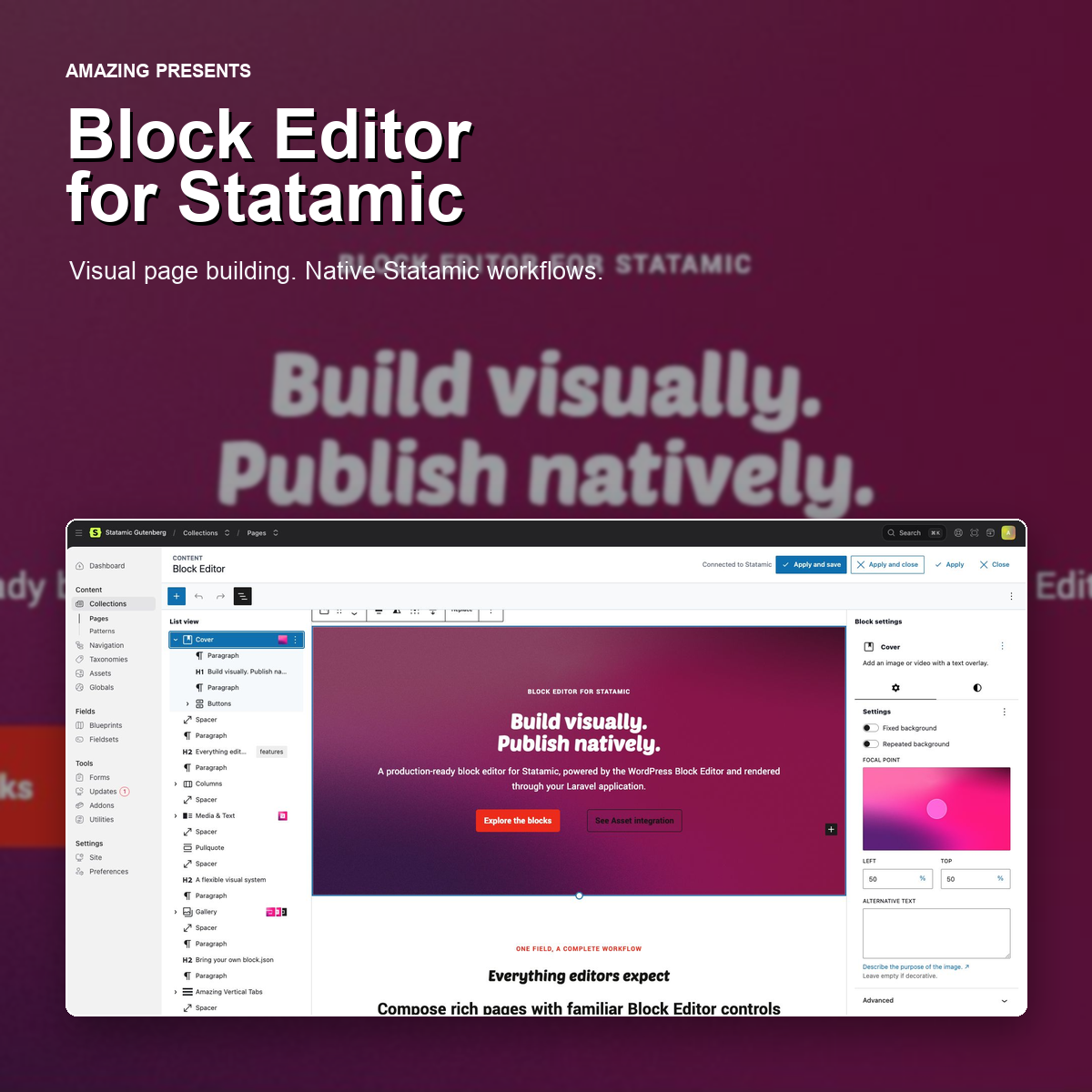

Visual body-content editing for Statamic
Block Editor for Statamic adds a production-ready visual body-content field to the Statamic Control Panel. Editors build rich layouts in a full-size Block Editor, while entries, metadata, permissions, revisions and publishing remain native to Statamic.
Content is stored as portable, WordPress-compatible serialized block markup and rendered through your Laravel + Statamic application.
How it fits into Statamic
This addon is a content field, not a replacement entry editor.
Use Statamic for:
- Entry titles and slugs
- Publication status and dates
- Taxonomies, SEO fields and separate cover images
- Revisions, permissions and publishing workflows
Use the Block Editor for the body content and page layout. A typical blueprint keeps the title and Block Editor field in the Main tab, with metadata in Statamic's Sidebar and SEO tabs. Render the entry title in your Statamic template, or add a Heading block when it belongs inside the body layout.
This separation gives editors a focused visual canvas without duplicating Statamic's content model or publishing controls.
Full-size body-content workflow
From a normal entry, the editor opens as a full-size overlay while Statamic's top bar and navigation remain available.
Inside Statamic Live Preview, editor and preview stay side by side in an integrated, resizable split view. Compact panes use temporary drawers for List View and Block settings, so the preview never gets pushed below the editor.
- Apply and save updates the field and saves the entry
- Apply and close updates the field and closes the editor
- Apply refreshes Live Preview without saving
- Close discards unapplied changes after confirmation
Highlights
- Full-size visual body-content editing inside the Statamic Control Panel
- Native block inserter, List View, toolbars, inspector controls and code editor
- Resizable Live Preview split view with explicit apply and save actions
- Statamic-managed synced and unsynced patterns
- Dedicated Statamic Assets browser for images, galleries, audio, video, files, covers and posters
- Project-local
theme.jsonsupport for colors, typography, spacing, widths, gradients, shadows and fonts - Variable fonts with multiple WOFF2 Unicode subsets through
fontFaceandunicodeRange - Native block styles using the standard
is-style-{name}class workflow - Project-local icons and custom blocks registered through compatible
block.jsonmetadata - Laravel-aware frontend rendering with scoped styles and scripts
- Content, wide and full-width alignment in editor and frontend
- Safe iframe embeds for YouTube, Vimeo, Spotify and SoundCloud
Native Statamic media workflow
Media blocks use Statamic Assets instead of a separate WordPress media library. Editors can browse every authorized container, navigate folders, search, upload and select the correct file type for the current block.
The asset detail panel supports alt text, title and caption metadata. Changes are written back to the Statamic asset, keeping media information available throughout the project.
Supported media workflows include image and gallery selection, Cover and Media & Text blocks, audio, video and file blocks, video poster images, container and folder browsing, and type-aware uploads.
Use your project's design system
Place an optional theme.json in your Statamic application to expose project colors, font families, font sizes, spacing presets, gradients, shadows and layout widths in the editor. The same settings generate scoped frontend CSS, keeping the editing experience close to the published result.
Variable fonts can use multiple fontFace records for the same family and weight range, each with a project-local WOFF2 file and validated unicodeRange subset. Font files and other theme assets live under resources/vendor/statamic-gutenberg in the host application.
Block styles can be registered from a project PHP file, configuration or a Laravel service provider. Editors choose them from the standard Styles panel and saved blocks receive the expected is-style-{name} class.
Patterns and custom blocks
Patterns can be managed as Statamic collection entries and organized with a taxonomy. Published patterns appear in the standard Patterns tab, with both synced references and normal editable insertion.
Custom blocks live in the host application rather than the addon. Add a compatible block.json folder with editor scripts, editor styles, frontend styles, server-side rendering and optional view scripts. The addon discovers and loads those assets in the correct environment.
Frontend rendering
Supported blocks are parsed and rendered through the addon's Laravel-aware renderer. Saved static markup is sanitized and enriched with block attributes where required. Dynamic and project-local blocks can use Blade or PHP rendering.
Add the frontend tags to your layout and render the augmented field inside an .sgb-content wrapper:
<head>
    {{ gutenberg:styles }}
</head>
<body>
    <main class="sgb-content">
        {{ content }}
    </main>
    {{ gutenberg:scripts }}
</body>
Add the fieldtype to a blueprint
content:
  type: gutenberg
  display: Body content
  assets_container: assets
  render_mode: blade
  allow_unknown_blocks: false
  sanitize_html: true
Each field can define its own allowed blocks, default Asset container and rendering options. Global defaults are available through the published configuration file.
Requirements
- Laravel + Statamic 6
- PHP and Composer versions compatible with the host Statamic project
- At least one Statamic Asset container
- Node.js and npm only when rebuilding Control Panel assets from source
Scope
Block Editor for Statamic provides a compatible block-content editing and rendering layer, not a complete WordPress runtime and not a replacement for Statamic's entry editor.
Entry title, slug, status, date, taxonomies, SEO, revisions and separate cover fields remain in Statamic. Arbitrary WordPress plugin blocks that depend on a full WordPress REST or PHP runtime are not automatically supported. Destructive media editing such as crop, rotate and delete remains part of Statamic's normal Assets workflow.