

Check a Statamic site's form emails still send, without saving a submission or emailing the client.
The usual way to check a live form is to submit it. That saves a submission, signs the address up to newsletters, creates a lead in the CRM and emails the client's staff, who then ask what happened.
Canary sends a form's real emails (its own template, subject, from address and mailer) to one test address, through the real queue. It doesn't save a submission or run the form's listeners, so newsletter and CRM integrations never see it, and it never changes the form itself.
php artisan canary:forms contact quote --to=you@example.comIf the emails arrive, the templates, sender, mail provider and queue worker are all working.
Installation
composer require d3creative/statamic-canaryRequires Statamic 6 and PHP 8.3+.
Usage
php artisan canary:forms {forms?*} {--to=} {--site=} {--pick}forms |
Handles of the forms to test. |
--to |
The address that receives every test email. |
--site |
Handle of the site to send as, on a multisite. Defaults to the default site. |
--pick |
Choose forms from the list, even if some are saved or configured. |
Picking forms from a list
If you run canary:forms with no handles, Canary lists every form on the site and you tick the ones to test. Forms that send no emails are listed last, since there's nothing for Canary to test in them. It never tests every form on its own: many sites have test forms or newsletter-only forms you won't want to send.
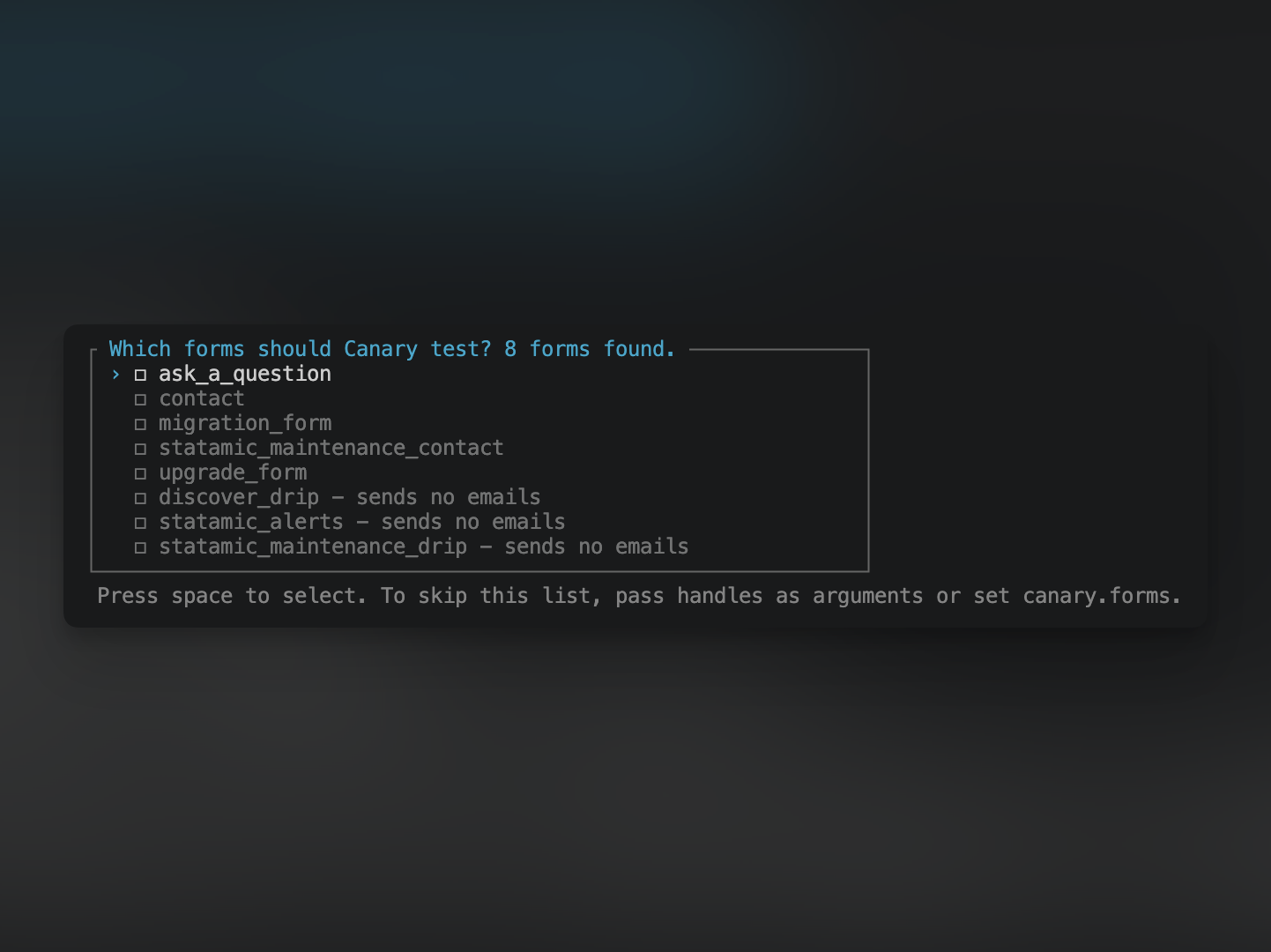
After you pick, Canary asks whether to save your choice. If you say yes, later runs test the saved forms without showing the list, including non-interactive runs such as deploy scripts. Run canary:forms --pick to choose again.
Saved forms are stored in resources/addons/statamic-canary.yaml. Save them on your local copy and commit the file, so every environment tests the same forms.
Setting defaults
To set the test address, publish the config:
php artisan vendor:publish --tag=canary-configThen add it to .env:
CANARY_TO=you@example.comNow php artisan canary:forms needs no options at all.
You can also list the forms in config/canary.php instead of saving them from the list:
'forms' => ['contact', 'quote'],Canary uses the first of these that gives it any forms: handles passed as arguments, then canary.forms, then the saved forms, then the list. With none of them, a non-interactive run (a deploy script, or --no-interaction) fails, because it can't show the list.
What you'll get
For each form, Canary builds an unsaved submission filled with sample values from the form's blueprint, then sends each of the form's emails with these changes:
tois your test address.- The subject starts with
TEST:. ccandbccare removed.
Everything else, including the template, from, reply_to and mailer, is unchanged. Email fields are filled with your test address, so automatic replies to the visitor come back to you too. Text fields get Test, so a subject like {{ full_name }} submitted the contact form. arrives as "TEST: Test submitted the contact form."
These changes are made to a copy of the form's settings in memory, never to the form itself. See Canary doesn't change your site.
Exit codes
The command exits non-zero if a form doesn't exist or its emails fail to dispatch, so a deploy script can stop. A form with no emails shows a warning but doesn't fail the run.
If the queue connection is sync, Canary warns you: the templates and sender are tested, but no queue worker is.
Canary doesn't change your site
Canary never edits your forms, templates, config or content.
- Form settings. Canary loads the form and swaps the recipients on that loaded copy, in memory, for the length of the run. The form's file is never written, so the next real submission goes to the real recipients as usual.
- Submissions. None are saved, even for forms that store submissions or accept file uploads.
- Integrations.
FormSubmittedandSubmissionCreatedaren't fired, so newsletter, CRM and other form listeners don't run.
The only file Canary writes is resources/addons/statamic-canary.yaml, and only when you choose to save your picked forms.
What could still email someone else
Canary controls the recipients it hands to Statamic. Anything that changes recipients after that is outside its control, for example:
- a custom
send_email_jobinconfig/statamic/forms.phpthat loads the form again or chooses its own recipients - a listener on Laravel's
MessageSendingevent, or a mail provider rule, that adds a recipient (such as an automatic BCC) to every email the site sends
On a site you don't know, check for these before running Canary, or run it with MAIL_MAILER=log first and read the recipients in the log.
What Canary doesn't check
- Form listeners. Newsletter, CRM and other integrations listen for
FormSubmittedandSubmissionCreated. Canary skips both events on purpose, so it can't tell you whether those integrations work. - Validation. Sample values only need to render in a template. Canary tests the email path, not the form.
- The inbox. Canary proves the email jobs were dispatched. Checking that they arrived is up to you.
A scheduled mode that alerts you when a form stops sending, and a Control Panel page, aren't in this version yet.
Canary and Mailables Viewer
Mailables Viewer previews your app's mailables in the Control Panel. It doesn't find form emails on its own, and it renders them without the form's template, subject or from address, using the first stored submission it finds. It also sends without going through the queue.
Canary uses each form's own settings and sample data from its blueprint, sends through the queue, and runs from the command line, so it fits a maintenance checklist or a deploy script. The two work well together.
Support
Canary is maintained by D3 Creative. Report bugs or ask questions in GitHub issues. For enquiries about managed Statamic maintenance, visit d3creative.uk/services/statamic-maintenance.
License
MIT. See LICENSE.